• Home
  • About Me
  • Contact Me
  • Downloads
  • White Papers
  • Web Sites
  • Post List
  • Articles
  • FAQ

Olof Simren - Microsoft Dynamics 365 Business Central Blog

  • Home
  • About Me
  • Contact Me
  • Downloads
  • White Papers
  • Web Sites
  • Post List
  • Articles
  • FAQ

Scrap in Production

July 16, 2014 Posted by Olof Simren Development, Inventory, Manufacturing 17 Comments

Microsoft Dynamics NAV has multiple ways in which you can handle scrap in the production. There are scrap related to an operation in the routing, there are scrap related to individual components and there are scrap related to the product being produced. Just like any other functionality, it is important to know all the options when configuring and implementing Dynamics NAV.

The scrap related setup has an impact on both the material and capacity planning. If you are using the standard costing method to value your inventory then the scrap related setup also has an impact on the cost roll-up. Scrap is quite common in a manufacturing environment and many companies could benefit from utilizing the functionality.

It is important to know that scrap in Dynamics NAV is truly scrap (waste), if it is something that you want to keep track of in the system as inventory and reuse somehow then it should be handled as additional output instead (e.g. by-products, reclaimed material, etc.). See my other blog post about Additional Outputs on Production Orders.

Below are the different options described with some examples where item A is produced by machining component B and then assembling it with component C. The routing with the two operations is setup like below.

Routing-Dynamics-NAV

The two components are in the production BOM like below. Note the routing link codes that link component B to operation 10 and component C to operations 20.

Production-BOM-Dynamics-NAV

Now let’s look at the different scrap related options one at a time using the above routing and production BOM.

Scrap % on the Item Card

The finished item can have a scrap percentage defined on the item card. This scrap percentage refers to the finished product and is used by NAV to both increases the required components and capacity need. If you are producing a 100 units and you define a 10% scrap on the item card you will get the demand for a 110 units of the components and the capacity need will also be according to producing 110 units.

In Dynamics NAV you find the Scrap % field on the Replenishment tab of the item card.

Scrap-Percent-on-Item-Card-Dynamics-NAV

When the production order is created the value of the Scrap % field from the item is transferred to the Scrap % field on the production order line.

Scrap-Percent-on-Production-Order-Line-Dynamics-NAV

The run time part of the capacity need on each of the operations is increased by 10 % (just like if we were making 110 units instead of 100).

Scrap-Percent-on-Production-Order-Line-Routing-Dynamics-NAV

The components required are also increased with 10%.

Scrap-Percent-on-Production-Order-Line-Components-Dynamics-NAV

This could for example be used if you after completed production have an inspection of the units (part of the routing) and you expect a certain failure rate.

Scrap % in Production BOM

You can also have a scrap % defined on the production BOM lines. This will increase the required quantity for that component but will not affect any of the other components or the capacity needs for the operations.

You set this up in the scrap % field on the production BOM line.

Scrap-Percent-on-Production-BOM-Dynamics-NAV

When the production order is created the value of the Scrap % field from the production BOM line is transferred to the Scrap % field of the production order component and the expected quantity for the component is increased accordingly.

Scrap-Percent-on-Production-Component-Components-Dynamics-NAV

This has no effect on the production order routing.

Scrap-Percent-on-Production-Component-Routing-Dynamics-NAV

The use of this could be if you have certain components that you consume where not all are going to be accepted for any reason, or if you only use a part of a component (like 9 inch of a 10 inch bar) and scrap the rest.

Scrap Factor % in the Routing

You can define scrap in relation to an operation as well. Dynamics NAV has a scrap factor % field in the routing that can be used to define if an operation generates scrap. This will increase the required quantities for all the components that are used in the operation and all previous operations. It will also increase the capacity need for the operation and all previous operations. If you use this then linking the components to the operations using the routing link codes are important (otherwise all your components will have increased quantities).

The scrap factor % is setup in the routing line.

Scrap-Factor-Percent-on-Routing-Dynamics-NAV

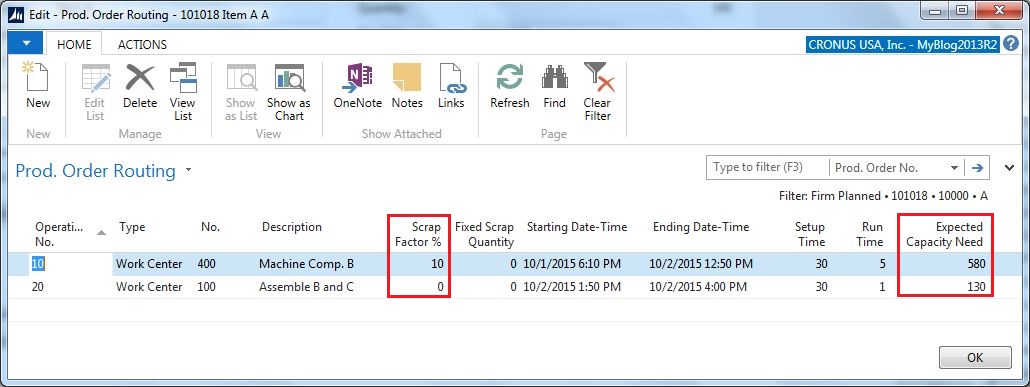
When the production order is created the value of the Scrap Factor % field from the routing line is transferred to the Scrap Factor % field of the production order routing and the capacity need for the operation is increased accordingly.
Scrap-Factor-Percent-on-Routing-Routing-Dynamics-NAV

The related components quantities are also increased accordingly.

Scrap-Factor-Percent-on-Routing-Components-Dynamics-NAV

This could for example be used for operations that have a certain expected failure rate.

Fixed Scrap Quantity in the Routing

Scrap related to an operation can also be defined as a fixed quantity. Dynamics NAV has a fixed scrap quantity field in the routing; it has the same effect as the scrap factor % but with the difference that it is specified in an absolute quantity instead of a percentage.

You set this up in the Fixed Scrap Quantity field on the routing.

Fixed-Scrap-Qty-on-Routing-Dynamics-NAV

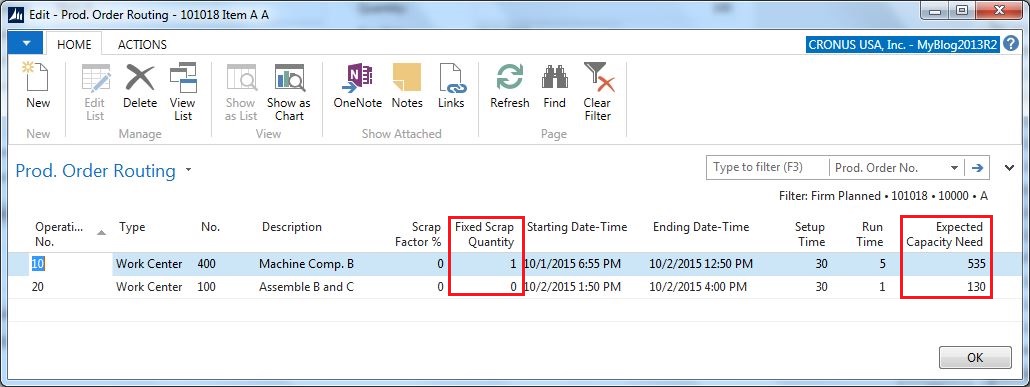
When the production order is created the value of the Fixed Scrap Quantity field from the routing line is transferred to the Fixed Scrap Quantity field of the production order routing and the capacity need for the operation is increased accordingly.
Fixed-Scrap-Qty-on-Routing-Routing-Dynamics-NAV

The related components quantities are also increased accordingly.

Fixed-Scrap-Qty-on-Routing-Components-Dynamics-NAV

This could for example be used for operations on a machine that needs to be setup and tested on a few units before starting the run. Another common example is if you are doing some destructive testing on a certain quantity as part of the operation.

Posting of Consumption with Scrap

Consumption should always be posted according to how many units you have consumed (both good and bad units). This way you get an accurate inventory balance and correct cost posted against the production order. Dynamics NAV does not differentiate between consumption of components that was scraped and components that was used in good parts, there is only one consumption quantity field and this is where the total consumed quantity should go.

If you want to record why you consumed more than expected then there is a reason code field that could be used. The reason code field is a field that is not in the journal by default so if you want to use this field you need to add it (in standard Dynamics NAV the reason code is setup against a journal batch instead of for each line, but just adding the field to the journal works good).

Production-Journal-Consumption-Reason-Code-Quantity-Dynamics-NAV

The Reason Code goes onto the value entries when the journal is posted and can be used to analyse reasons for scrap.

Value-Entries-With-Reason-Code-Dynamics-NAV

The downside of the reason codes are that they are not mandatory for scrap, and they are hard to make mandatory since there is only one field to enter the consumed quantity (you don’t want to have it mandatory all the time since it then adds an overhead when posting consumption). Because of this, I think a better way to record reasons for scrap is to use scrap codes for the outputs (described below).

Posting of Output with Scrap

For posting of the operation outputs Dynamics NAV has two fields, output quantity and scrap quantity. It is important the quantity of the good parts and the scrap parts are separated when posting the output. The output quantity is obviously the quantity that goes into stock (if it is the last operation) and carries all the production costs, while the scrap quantities are only recorded against the operation on the capacity ledger entries.

For output you also have a Scrap Code field where you can select a code to record the reason for the scrap.

Production-Journal-Output-Scrap-Code-Quantity-Dynamics-NAV

The Scrap Quantity and Scrap Codes goes onto the capacity ledger entries when the journal is posted and can also be used to analyse reasons for scrap.

Capacity-Ledger-Entries-Scrap-Code-Dynamics-NAV

If you are back flushing your components (see previous post related to Flushing Methods) then the quantity of those are based on the output quantity plus the scrap quantity, so it is important to enter the scrap quantities in this case.

The scarp codes are in standard Dynamics NAV only for machine centers (for some unknown reason), to enable it for work centers as well you could change the code as below (to make it available for all types of outputs).

Scrap-Code-for-Output-Dynamics-NAV

To make the scrap code mandatory if there is a scrap quantity, just alter the code as below. Making scrap codes mandatory when posting scrap makes the data more reliable, otherwise you sooner or later end up with scrap quantities without scrap codes.

Scrap-Code-Mandatory-Dynamics-NAV

As with anything else; setup some sample items and model how things behave before applying/changing the setup for a larger sets of items.

Share this:

  • Share on Facebook (Opens in new window) Facebook
  • Share on X (Opens in new window) X

Related


Discover more from Olof Simren - Microsoft Dynamics 365 Business Central Blog

Subscribe to get the latest posts sent to your email.

Tags: ConsumptionDevelopmentOutputProductionProduction BOMProduction OrdersRoutingScrap
17 Comments
Share
4

About Olof Simren

I am a Microsoft Dynamics NAV and 365 Business Central Expert, I started implementing Microsoft Dynamics NAV in 2002, back then it was called Navision Attain. Throughout the years there has been many exciting implementations in different parts of the world, all of them with different challenges but with one common theme; manufacturing. As a consultant, I bring over 20 years of experience in implementing Microsoft Dynamics NAV and 365 Business Central within manufacturing and distribution companies. The services I offer includes project management, consultation, development and training. Feel free to contact me if you need help with anything related to Microsoft Dynamics NAV or 365 Business Central. I work through my company Naviona where I team up with other skilled Microsoft Dynamics NAV and 365 Business Central Experts.

You also might be interested in

Activate Item Tracking for Items with Ledger Entries

Jun 15, 2014

A common request is to activate item tracking (lot numbers[...]

Subcontracting Part 5: Perform Subcontracting

Sep 17, 2014

This is the fifth post on my blog related to[...]

Field Level Security using Events in Dynamics NAV 2016

Mar 11, 2016

One of the cool new features in Microsoft Dynamics NAV[...]

17 Comments

Leave your reply.
  • Marcel Lathouwers
    · Reply

    July 20, 2014 at 5:10 AM

    Again a great post! Very informative and detailed.
    Keep it up.

  • sanjay tripathy
    · Reply

    July 22, 2014 at 4:20 AM

    Nice post,m It’s very helpfull for user who has doubt regarding using of scrap in production process.

  • Daniel Lennartsson
    · Reply

    February 2, 2015 at 2:46 PM

    Hi Olof

    Really like this blog!

    I have thought about the best way to follow up on consumption and to compare calculated quantities to consumed quantities.
    I don´t know what is the best way regarding this, the Item Ledger Entries keeps the lines separated when consuming more than Calculated on a consumption. One way to solve it is to put a flow field to the “Prod. Order Component” table. Another way for me is to write a Query.

    I try to make reporting as simple as possible and for me it makes no sense in many cases that the Operator that report the consumption shall keep track of the Scrap quantities I all cases.

    I would really like to have your thoughts about this and what you normally recommend when do Post Calculation analysing.

    / Daniel

    • Olof Simren
      · Reply

      Author
      February 2, 2015 at 5:43 PM

      Hi Daniel,
      Thanks for your comment!

      What I typically do is a report that compares the total quantity of the item ledger entries with the total output quantity multiplied with the quantity per for each of the production order components.
      This way you can capture consumption that was both more and less (and also get the costs related to it, not only quantities).

      You can’t always compare with the expected quantity on the production order components since if you produce less or more than the production order quantity this will be wrong and the expected quantity might also be ‘inflated’ based on a nominal scrap % (described above). Therefore I think using the quantity per multiplied with the total output quantity is the best way of doing it.

      /Olof

  • Irosh A
    · Reply

    October 28, 2015 at 12:05 PM

    Thank you. This was very useful for me. Nicely elaborated every detail.

  • Safwat Saleh
    · Reply

    January 7, 2016 at 9:18 AM

    Hi Olof
    This is really informative and well illustrative article.
    kindly I would like to ask you when I enter the scrap % / Qty will it affects the scrap % registered in the Item card or routing?
    If it does not; is there is a way to make it affect as a dynamic average for the next production order
    Thanks in advance for your valuable input
    Safwat

    • Olof Simren
      · Reply

      Author
      January 7, 2016 at 5:45 PM

      Hi Safwat,
      Thanks for you comment.
      No, there is no way in standard NAV where the scrap of previously reported production orders can affect future orders expected scrap.
      It would be a nice feature though. I am sure it can be programmed, maybe as a batch routine that will calculate an average based on history and then update the items and existing orders somehow.
      If it can be described it can be programmed. 🙂

      /Olof

      • Safwat
        · Reply

        January 8, 2016 at 6:28 AM

        Dear Olof;
        Thanks for your prompt reply.
        As you well said, I used to do it in Excel 20 years ago when I was the Planning manager in one of the Egyptian – Germany Fittings foundry. Hope we can develop something together to dynamically enhance the planning accuracy towards performance excellence.
        Best Regards
        Safwat

  • Henrik
    · Reply

    August 17, 2016 at 7:19 AM

    Thank you. Microsoft, please hire Olof for online help.

    One thing – NAV2016.
    Do you know why is it that routing scrap % AND component scrap % affects the expected component use, but when backward flushing is used on components then only component scrap % is used.

    Qty. out = 100
    Qty. per = 1
    Scrap % (comp) = 10%
    Scrap % (routing) = 20%
    Qty. exp. = 100 * 1,10 * 1,20 = 132

    Actual output = 90
    Actual consumption should be = 132 * 90/100 = 118,8
    Instead its = 90 * 1,10 = 99 ???
    No routing scrap is included.

    More over the output qty in the prod. jnl. is = 100 * 1,10 = 111 and not 100 (original qty).
    Scrap = Scrap and NOT output that can be counted.

    • Olof Simren
      · Reply

      Author
      August 17, 2016 at 9:13 PM

      Hi Henrik,
      I suspect that you forgot to post the scrap quantity for the operation, could this be it?

      The expected quantity for the components are based on expected output (both good output and scrap output), but the back flushing is based on the actual output (both output quantity and scrap quantity). So, when you post the output you also need to record the bad parts that was produced on the operation (using the scrap quantity field).

      /Olof

  • Lien Nguyen
    · Reply

    March 16, 2018 at 4:18 AM

    Hi Olof,
    Thank you, nice article. This was very useful for me.
    I have a question about scrap expense in production: if user want to record separate scrap expense to diffrente account ( not Inventory Account but Production Expense Account) for scrap material and scrap capacity, how to manage it in Navision system?

    Thank you in advance

  • Kenneth Harrison
    · Reply

    April 10, 2019 at 1:22 PM

    Can you explain what value the scrap is charged to scrap expense at? (using a standard cost system). Also, what are the accounting entries when we report scrap?
    Obviously, it should not be at the full cost of the finished product.

    How do we handle consumption when some of the components get added into the manufacturing process at an operation that occurs after the scrap? If we had an order for ten pieces and we scrap one at the second operation, we would not want to process a consumption transaction for more than nine units of a component which is added at the third operation. Assume we can’t redo steps one and two for one piece and we can complete the order with nine pieces.

    Another problem I see with reporting output quantity with the good and bad units is that we would be reporting the bad half complete unit at full value and potentially overstating the value of scrap.

    We also don’t want to report output from manufacturing as a metric when some of those units are defective.

  • Beth
    · Reply

    April 15, 2019 at 3:30 PM

    Hi Olof,
    I was wondering if the scrap factors are cumulative.
    If there is a scrap factor on the item, Production BOM, routing, and work center will they add up to a much-inflated scrap factor?

    Thanks,
    Beth

    • Olof Simren
      · Reply

      Author
      June 4, 2019 at 5:55 AM

      Hi Beth,
      The scrap on the Item, Production BOM and Routing are cumulative, since they are used for different things.
      The one on the machine centers are just for defaulting onto the Routing.

      /Olof

  • Bimal
    · Reply

    May 25, 2019 at 5:50 AM

    Hey Olof,
    Is it possible to develop the approval functionality before you put in scarp the material.

  • Bimal sharan
    · Reply

    May 25, 2019 at 5:59 AM

    Hey Olof,

    For return of material, sales return will be used, based on it a released production order should be generated by user to process the repairing of goods and then the FG (Finish Goods) will be dispatched against a new sales order. (Note: In case of sales return, entire goods will be shown as returned in system)

    i wanna show a part of my material is coming back to my premises instead of total assembly (entire goods)

  • Paul H
    · Reply

    August 25, 2023 at 3:57 AM

    Hi Olof,

    Great article, your explanations are very clear.

    However, if we choose to post the scrap in the output, here is an example :
    – Consumption : Item A + Item B
    – Output : Item C

    If damage occurs only on Item A during production process, how to reflect the scrap in the output line as it is Item C (=A+B) ?

    /Paul

Leave a Reply

Your email is safe with us.
Cancel Reply

Subscribe to My Blog via Email

Check Out Our Apps in AppSource

My Dynamics NAV Partner

Naviona, LLC

Categories

  • Assembly (3)
  • Development (35)
  • Finance (14)
  • General (28)
  • Inventory (24)
  • Manufacturing (36)
  • Miscellaneous (27)
  • Purchase (9)
  • Sales (11)
  • Warehouse (7)

Tags

.net Add-in AI AppSource Assembly Assembly BOM Business Central CAL Capacity Consumption Contact Copilot Costs Customer Development Dimensions Excel Finance Flushing General Ledger Inventory Item Item Tracking Low-Level Code MRP NAV 2015 NAV 2016 Output Planning Production Production BOM Production Orders Purchase Orders Receipts Reporting Reports Routing Sales Sales Order Stockkeeping Unit Subcontracting Task List Warehouse Warehouse Shipment Work Center

Recent Posts

  • Business Central Configuration Audit using Vibe Coding
  • Copilot in Planning Parameter Worksheet
  • Copilot in Planning Worksheet
  • Copilot Inventory Queries
  • Record Deletion Tool for Business Central in AppSource
  • Reopen Finished Production Orders
  • XML Buffer and CSV Buffer Tables
  • Functionality Improvements in NAV 2017
  • Reversing Production Output and Consumption
  • Return Merchandise Authorization (RMA)

Categories

  • Assembly
  • Development
  • Finance
  • General
  • Inventory
  • Manufacturing
  • Miscellaneous
  • Purchase
  • Sales
  • Warehouse

Contact Us

We're currently offline. Send us an email and we'll get back to you, asap.

Send Message

Categories

  • Assembly (3)
  • Development (35)
  • Finance (14)
  • General (28)
  • Inventory (24)
  • Manufacturing (36)
  • Miscellaneous (27)
  • Purchase (9)
  • Sales (11)
  • Warehouse (7)

Tags

.net Add-in AI AppSource Assembly Assembly BOM Business Central CAL Capacity Consumption Contact Copilot Costs Customer Development Dimensions Excel Finance Flushing General Ledger Inventory Item Item Tracking Low-Level Code MRP NAV 2015 NAV 2016 Output Planning Production Production BOM Production Orders Purchase Orders Receipts Reporting Reports Routing Sales Sales Order Stockkeeping Unit Subcontracting Task List Warehouse Warehouse Shipment Work Center

Recent Posts

  • Business Central Configuration Audit using Vibe Coding
  • Copilot in Planning Parameter Worksheet
  • Copilot in Planning Worksheet
  • Copilot Inventory Queries
  • Record Deletion Tool for Business Central in AppSource
  • Reopen Finished Production Orders
  • XML Buffer and CSV Buffer Tables
  • Functionality Improvements in NAV 2017
  • Reversing Production Output and Consumption
  • Return Merchandise Authorization (RMA)

Recent Comments

  • Olof on Business Central Configuration Audit using Vibe Coding
  • Andrew Trayfoot on Business Central Configuration Audit using Vibe Coding
  • Barrett Allen on Reopen Finished Production Orders
  • Kateryna on Business Central Configuration Audit using Vibe Coding
  • Takeshi Setoya on Reopen Finished Production Orders
  • Steve on Consignment Inventory
  • Olof Simren on Copilot in Planning Worksheet
  • Omaer Amjad on Copilot in Planning Worksheet

© 2026 · Olof Simren

  • Home
  • About Me
  • Contact Me
  • Downloads
  • White Papers
  • Web Sites
  • Post List
  • Articles
  • FAQ
Prev Next