• Home
  • About Me
  • Contact Me
  • Downloads
  • White Papers
  • Web Sites
  • Post List
  • Articles
  • FAQ

Olof Simren - Microsoft Dynamics 365 Business Central Blog

  • Home
  • About Me
  • Contact Me
  • Downloads
  • White Papers
  • Web Sites
  • Post List
  • Articles
  • FAQ

Additional Outputs on Production Orders

March 24, 2014 Posted by Olof Simren Inventory, Manufacturing 17 Comments

Having additional outputs on production orders (sometimes refereed to as by-products or reclaimed material) is a common requirement. It could be scrap that should go back into inventory for further processing (melting it down, regrinding it, etc…) or it could be multiple products that are produced at the same time in a process.

This can basically be handled in two ways in Dynamics NAV:

  1. Negative Consumption
  2. Adding Production Order Line(s) for Multiple Outputs

In both ways you need to consider both the operational aspect and the inventory costs aspect. Option #1 is easier from an operational point of view since it allows defaulting an item in the Production BOM with a negative quantity and you can back flush it based on the output or have users enter the quantity that goes back into inventory manually. If the additional output should have an inventory value then the better option from an inventory cost aspect is #2 since with this option the additional output can have both Routing and Components that forwards the costs (option #1 is similar to making a positive adjustment from an costing perspective, which should be avoided). The downside with option #2 is that a user manually needs to enter the additional output on the production order. But like with everything else in Dynamics NAV, we might be able to automate it by some simple adjustments to the code.

Something like this could be done:

Create a new table where the additional outputs related to each of the items being produced can be defined, call it ‘Additional Output’. In this table we can then list the additional items that are being produced together with a Production BOM and a Routing to be used to capture the costs.

In this example we are cutting 8 ft bars (item ‘R114-8’) into 7 ft bars (item ‘R114-7’) and during that process we also get 1 ft bars (item ‘R114-1’), one for each time we cut a bar (trying to make it as simple as possible :-)). We define item ‘R114-1’ to be an additional output to item ‘R114-7’ in the new table like this:

AdditionalOutput

The Production BOM ‘R114-1’ has 1/8 (0.125) of the 8 ft bar as a component.

ByProductBOM

The Routing ‘BACKFLUSH’ is a routing setup with the purpose of back flushing the output only (there are no capacity costs or scheduling involved).

BackflushRouting

The Production BOM for the 7 ft bar has 7/8 (0.875) of the 8 ft bar.

ProductionBOMforBar

The Routing for producing the 7 ft bar has some time and capacity costs attached to it (in this example we want all the capacity costs to be applied to the 7 ft bar while the 1 ft bar will only have material costs).

CuttingRouting

We then modify the Refresh function, by the following: In the ‘Copy’ function of the ‘99000787 – Create Prod. Order Lines’ codeunit we insert a call to a new function that will insert our Additional Output Line(s). In this case we called it ‘InsertAdditionalOutput’.
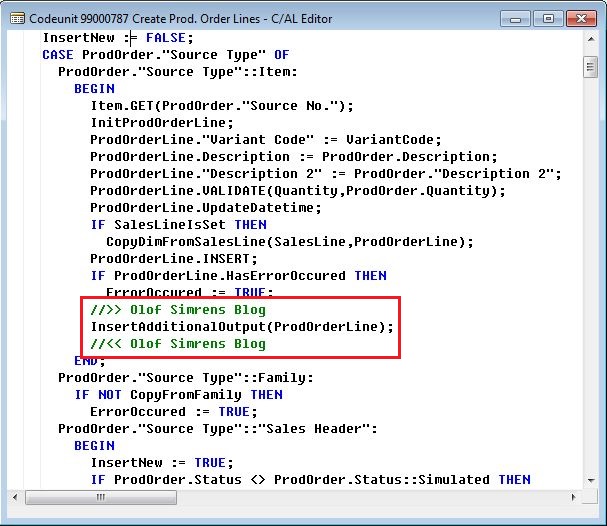
AdditionalOutputCode1

The function ‘InsertAdditionalOutput’ looks like this:
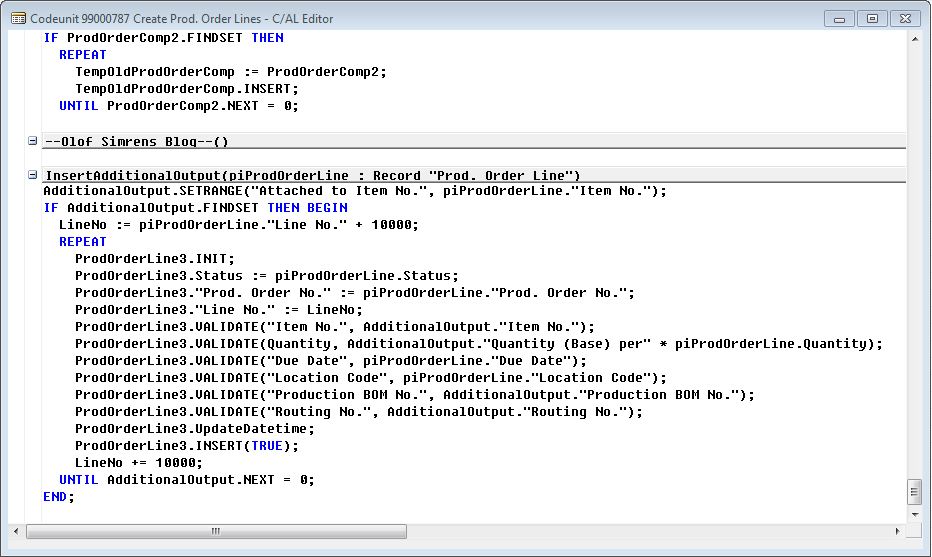
AdditionalOutputCode2

That’s it!! 🙂

Now when we refresh a production order for the 7 ft bars we also get an additional output line with the 1 ft bars with the Production BOM and Routing according to our new table. Sweet…

ByProductProductionOrder

Since everything is set to backward flushing we just change the status to finished once the production is done and Dynamics NAV will post all the consumption and outputs creating the following item transactions:

ItemLedgerEntries

Above you can see that 1/8 of the material costs of the 8 ft bar has been applied to the output of the 1 ft bar. The 7 ft bar has a cost equal to 7/8 of the 8 ft bar plus the capacity costs defined in the routing.

Some things to note:

The planning worksheet (the MRP calculation) will not see the demand triggered by the additional outputs during its calculation, this demand will first show when the order is created.

The code above is for illustration only, use it on your own risk. I know that when you create production orders from the planning worksheet they are not refreshed the same way so this needs to be added as well to codeunit ‘99000813 – Carry Out Action’.

In a future blog I will describe a way to distribute the costs posted against one production order line towards multiple output lines, something that is useful if you for example would like to spread the capacity costs across all outputs.

Share this:

  • Share on Facebook (Opens in new window) Facebook
  • Share on X (Opens in new window) X

Related


Discover more from Olof Simren - Microsoft Dynamics 365 Business Central Blog

Subscribe to get the latest posts sent to your email.

Tags: DevelopmentOutputProduction
17 Comments
Share
8

About Olof Simren

I am a Microsoft Dynamics NAV and 365 Business Central Expert, I started implementing Microsoft Dynamics NAV in 2002, back then it was called Navision Attain. Throughout the years there has been many exciting implementations in different parts of the world, all of them with different challenges but with one common theme; manufacturing. As a consultant, I bring over 20 years of experience in implementing Microsoft Dynamics NAV and 365 Business Central within manufacturing and distribution companies. The services I offer includes project management, consultation, development and training. Feel free to contact me if you need help with anything related to Microsoft Dynamics NAV or 365 Business Central. I work through my company Naviona where I team up with other skilled Microsoft Dynamics NAV and 365 Business Central Experts.

You also might be interested in

The Low-Level Code

Jun 4, 2014

Do you know what the low-level code in Microsoft Dynamics[...]

Display Symbols and Different Fonts in Dynamics NAV 2013 R2

Apr 29, 2014

Some weeks ago I came across a requirement to be[...]

Default Dimension Priorities for Production Order Components

May 4, 2014

In one of my earlier blog posts, Dimensions on Production[...]

17 Comments

Leave your reply.
  • Olof Simren
    · Reply

    Author
    May 29, 2014 at 7:11 PM

    People have approached me with questions about using the Family functionality instead when dealing with multiple outputs. The family functionality is great, but it has one huge downside, which is you can’t plan replenishment of families. MRP will not create production orders like that. This makes the functionality kind of limited for manufacturing companies since most will have to do some type of material planning.
    A family also shares a routing where the capacity cost is distributed based on the quantities across the different outputs, this limits it a bit as well in my mind.

    • Sara
      · Reply

      October 1, 2017 at 3:53 PM

      Olaf – I am not seeing the capacity cost distribute across the different outputs when the production order is for a family. Capacity entries in the output journal are resolving to the production order line. Is there a way to make the capacity entry distribute to the lines on the production order without modification? (NAV 2017)

      • Olof Simren
        · Reply

        Author
        October 2, 2017 at 8:17 AM

        Hi Sara,
        It should do that in standard NAV. Did you finish the order and ran the cost adjustment batch job?

        /Olof

  • sanjay tripathy
    · Reply

    July 22, 2014 at 4:22 AM

    nice post

  • David
    · Reply

    March 6, 2015 at 12:35 AM

    Great article. I was looking for an ERP for small medium production companies that could manage scrap and multiple outputs… And it wasn’t an easy task! It looks possible in NAV, but I’m scared of introducing too much customization vs standard. Your blog is AWESOME!

    • Olof Simren
      · Reply

      Author
      March 6, 2015 at 9:32 AM

      Hi David,
      Thanks for your comment!
      You can also look into what add-ons there are that will do the work for you, then you might not need much customizations.

      /Olof

  • Dhina
    · Reply

    April 8, 2015 at 5:48 AM

    Hi Olof Simren,

    Your articles are very nice. Thanks.

    I have some scenario in my mind. Could you please tell me how to handle this in to NAV.

    We have a Moulding Machine. One Mould will have 6 cluster and each cluster will have 4 cavities. Based on the customer demand we may run 6 different items in a 6 different cluster. Example : Cluster 1 – Item A , Cluster 2- Item B, Cluster 3- Item C, Cluster 4- Item D, Cluster 5- Item E and Cluster 6- Item F. We want to create a single production order for all the 6 items. How to handle this scenario in to NAV ? Any idea?
    We can’t split this in to 6 different Prod. Order. Input raw material same.

    • Olof Simren
      · Reply

      Author
      April 8, 2015 at 9:52 AM

      Hi Dhina,
      I would start with looking into the Family functionality (since it is standard NAV).
      Create a Family for the Mold, and in the Family you list the 6 items with their quantities.
      This way you get one production order for the 6 items and with a shared routing.

      Keep in mind that if you are going to use MRP to create the production orders then the Family functionality will not work (Family production orders have to be created manually).
      If this is the case then you need to do some kind of modification like above.

      /Olof

  • Atul garg
    · Reply

    June 5, 2015 at 2:17 AM

    Nice Post, Simren!!!
    I was looking for the same kind of scenario, your post will be great help for me. Thanks.
    I have some scenario in my mind in addition to above example. Could you please tell me how to map this in to NAV.
    i.e.
    In some manufacturing companies, stock will be calculated on its weight/volume (L X B X H) as well as No. of Units (as you mentioned in your example),
    Now My Question is how we can use both together ?
    I am thinking of customization on item card for Length, Breath & height and calculate volume for each open item ledger entries for same item.
    Please Suggest ….
    Thanks in advance

    • Olof Simren
      · Reply

      Author
      June 5, 2015 at 8:47 AM

      Hi Atul,
      Thank you for you comment.
      I would suggest to use the Height, Width and Length fields that are already available in the Item Unit of Measure table (there is also a Cubage field, so maybe use that one as well). The fields are not visible by default, so you have to click ‘Choose Columns..’ to see them.
      Then based on those you can do your calculations, reports, etc.. as needed by the business.

      /Olof

  • Atul garg
    · Reply

    June 23, 2015 at 4:49 AM

    Hi Simren,
    Hope you are fine.
    First of all I would like to appreciate for your blog’s as they are really helpful.
    Simren, I have one scenario can you please suggest how we can achieve this in NAV.
    Scenario:
    Step 1:- Purchase item A while receiving the item A, we are also receiving some set of Quality Certificate/Test Certificate etc. with that. Each receipt has separate QC/TC.
    Step 2:- Item A is consumed to make item B. (Same Example as you stated above)
    Step 3:- Sales of Item B, Now we want to print the same QC/TC as we have received at the time of purchase of item A.

    We are using NAV 2013, and I am thinking to use Link Functionality (You may attach or link the path where you save the incoming documents Qc/Tc. considering the folder path having the receipt No. & item No. e.g. C:\ShareFolder\PR001\itemA)

    Now, how can I get the details of my item consumed (item A – from which receipt) for that particular sales of item B. ?

    As per my understanding,
    1. – For item B (which we want to sell) has ILE with entry type as OUTPUT even that ILE has Production Order No. & Production Order Line No.
    2. – From that Prod. Order No & Production Order Line No. we can search Production order Component Table for the item which we had consumed (We do not have fixed Prod. BOM)
    3. -From ILE we find consumption entry with Item No., Production Order No., Production Order Line No.
    even we can skip point 2, and directly search ILE with Entry type as consumption, Production Order No., Production Order Line No.
    4. -From that consumption ILE entry Number we can find inbound entry no. in Item application entry.
    5. -Inbound Entry no. will give the ILE Document No. (Receipt No.)
    Now we have Receipt No. & Item No. we can get the Documents from that path.
    please suggest.

    • Olof Simren
      · Reply

      Author
      June 24, 2015 at 3:54 PM

      Hi Atul,
      Thanks for your comment!

      I think your own suggestion sounds OK, and you might be able to write a function or something to find the related receipt that way (instead of doing it manually).
      Were you might run into problems are if you have done any more translations on item A, like moving it between two locations, etc.. then it can become a but complex.

      To me, if you have the above requirements (CT/TC on receiving) then lot number tracking is a prospect.
      If your inventory is lot tracked you then you use the item tracing functionality and NAV will trace back to the original receipts automatically.

      /Olof

  • Vijay Mishra
    · Reply

    December 17, 2015 at 4:28 AM

    This post is really great!! We are using NAV for plastic manufacturing company and I was looking for the second option. I was already using option from BOM but it was leading us to wrong costing. I will try the second one because we are not using planning functionality.
    Thanks for great post!!!

  • Antonio
    · Reply

    April 11, 2016 at 9:33 AM

    Great post Olof, really good…
    I have a question related to this. We release production orders with two lines, one for the final product and one for the intermediate.
    How would you do, as soon as intermediate is done, to… something like auto-put-away and then auto-pick for components of the final product of the same order?
    It is kind of wierd to have the production employee reporting NAV of a “phantom” put-away and a “phantom” pick since the intermiate never goes out from production line.
    I wouldnt mind to report an output of intermediate and simultaneusly an input of it to final, but having putaways and picks seems not possible.

    • Olof Simren
      · Reply

      Author
      April 25, 2016 at 11:18 PM

      Hi Antonio,
      You will need to go through the complete output and consumption steps, if the location is setup with both picks and put-aways this is a bit involved.
      You either do some kind of modification to streamline this, or you set up the item on the second line to be a true phantom and you only get one production order line.

      /Olof

  • Dimon
    · Reply

    November 15, 2016 at 2:35 AM

    Hello Olof,

    I’m interested in the second way you have described.

    If you have make a production order with the additional output and update the planning worksheet:
    will the planning worksheet give you the information, that you have to cancel the item (additional output) in the production order, when there is no need or you need these item later (later date).?

    Moreover, I can not find these additional output card. Do I find it in general? perhaps you can send me a screenshot to my Mail?

    Best regards

    • Olof Simren
      · Reply

      Author
      November 15, 2016 at 8:56 AM

      Hi Dimon,
      Yes, if you plan on the item that’s on a second line of a production order then MRP will be able to tell you to cancel this line (although the purpose of this blog post if to show how by-product or reclaim can be handled so cancelling the second line for scenarios like that are not really feasible).
      This blog post describes a modification, so without building this yourself you will not find it in you solution.

      /Olof

Leave a Reply

Your email is safe with us.
Cancel Reply

Subscribe to My Blog via Email

Check Out Our Apps in AppSource

My Dynamics NAV Partner

Naviona, LLC

Categories

  • Assembly (3)
  • Development (35)
  • Finance (14)
  • General (28)
  • Inventory (24)
  • Manufacturing (36)
  • Miscellaneous (27)
  • Purchase (9)
  • Sales (11)
  • Warehouse (7)

Tags

.net Add-in AI AppSource Assembly Assembly BOM Business Central CAL Capacity Consumption Contact Copilot Costs Customer Development Dimensions Excel Finance Flushing General Ledger Inventory Item Item Tracking Low-Level Code MRP NAV 2015 NAV 2016 Output Planning Production Production BOM Production Orders Purchase Orders Receipts Reporting Reports Routing Sales Sales Order Stockkeeping Unit Subcontracting Task List Warehouse Warehouse Shipment Work Center

Recent Posts

  • Business Central Configuration Audit using Vibe Coding
  • Copilot in Planning Parameter Worksheet
  • Copilot in Planning Worksheet
  • Copilot Inventory Queries
  • Record Deletion Tool for Business Central in AppSource
  • Reopen Finished Production Orders
  • XML Buffer and CSV Buffer Tables
  • Functionality Improvements in NAV 2017
  • Reversing Production Output and Consumption
  • Return Merchandise Authorization (RMA)

Categories

  • Assembly
  • Development
  • Finance
  • General
  • Inventory
  • Manufacturing
  • Miscellaneous
  • Purchase
  • Sales
  • Warehouse

Contact Us

We're currently offline. Send us an email and we'll get back to you, asap.

Send Message

Categories

  • Assembly (3)
  • Development (35)
  • Finance (14)
  • General (28)
  • Inventory (24)
  • Manufacturing (36)
  • Miscellaneous (27)
  • Purchase (9)
  • Sales (11)
  • Warehouse (7)

Tags

.net Add-in AI AppSource Assembly Assembly BOM Business Central CAL Capacity Consumption Contact Copilot Costs Customer Development Dimensions Excel Finance Flushing General Ledger Inventory Item Item Tracking Low-Level Code MRP NAV 2015 NAV 2016 Output Planning Production Production BOM Production Orders Purchase Orders Receipts Reporting Reports Routing Sales Sales Order Stockkeeping Unit Subcontracting Task List Warehouse Warehouse Shipment Work Center

Recent Posts

  • Business Central Configuration Audit using Vibe Coding
  • Copilot in Planning Parameter Worksheet
  • Copilot in Planning Worksheet
  • Copilot Inventory Queries
  • Record Deletion Tool for Business Central in AppSource
  • Reopen Finished Production Orders
  • XML Buffer and CSV Buffer Tables
  • Functionality Improvements in NAV 2017
  • Reversing Production Output and Consumption
  • Return Merchandise Authorization (RMA)

Recent Comments

  • Olof on Business Central Configuration Audit using Vibe Coding
  • Andrew Trayfoot on Business Central Configuration Audit using Vibe Coding
  • Barrett Allen on Reopen Finished Production Orders
  • Kateryna on Business Central Configuration Audit using Vibe Coding
  • Takeshi Setoya on Reopen Finished Production Orders
  • Steve on Consignment Inventory
  • Olof Simren on Copilot in Planning Worksheet
  • Omaer Amjad on Copilot in Planning Worksheet

© 2026 · Olof Simren

  • Home
  • About Me
  • Contact Me
  • Downloads
  • White Papers
  • Web Sites
  • Post List
  • Articles
  • FAQ
Prev Next