• Home
  • About Me
  • Contact Me
  • Downloads
  • White Papers
  • Web Sites
  • Post List
  • Articles
  • FAQ

Olof Simren - Microsoft Dynamics 365 Business Central Blog

  • Home
  • About Me
  • Contact Me
  • Downloads
  • White Papers
  • Web Sites
  • Post List
  • Articles
  • FAQ

Default Dimension Priorities for Production Order Components

May 4, 2014 Posted by Olof Simren Development, Finance, Manufacturing 1 Comment

In one of my earlier blog posts, Dimensions on Production Orders, I described how the dimensions on the production orders in Microsoft Dynamics NAV gets populated and posted. In that blog post I described that the dimensions on the production order components are inherited from the production order lines and therefor the consumption is posted with dimensions according to the default dimensions of the output item.

If this is not wanted (which is quite common) then Dynamics NAV can easily be changed to accommodate posting consumption with dimensions according to the components instead.

Here is one way of doing it.

In other parts of the application (like on a sales and purchase documents) you have the option to specify default dimension priorities to define what would happen if a conflict arrive where two entities have different dimension values for the same dimension. Lets use the same method for the production orders (I am a big fan of reusing concepts that are in other areas since this creates consistency throughout the application).

We start with adding a Manufacturing source code to the Source Code setup table and page. The field have a table relationship to the source code table just like the rest of the fields in this setup table. We also create a new source code record, calls it ‘MFG’ and selects it in our new manufacturing field in the source code setup table.
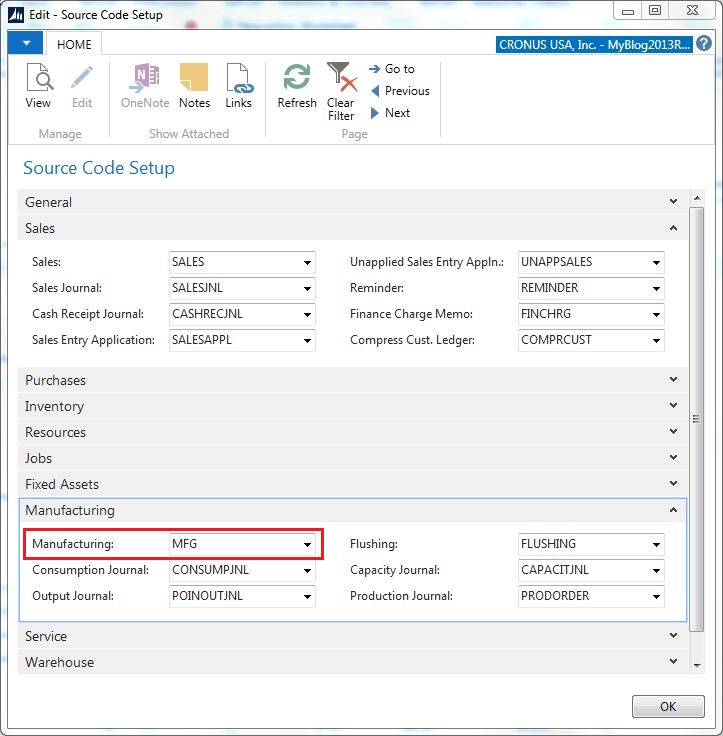
SourceCodeSetup

Next we need to add some code in the dimension management Codeunit (408) to allow selecting the production order lines in the default dimension priority page. The code to add is according to below (in Codeunit 408, function SetupObjectNoList).

AddProductionOrderLine

After this we can go ahead and setup our default dimension priorities to prioritize item dimensions before production order line dimensions. We do this by selecting the source code ‘MFG’ and list the item and prod. order line tables with priority 1 and 2.

DefaultDimensionPriorities

Now we have done the setup, what is left is to go and change the code that retrieves the dimension set id for the production order components. The code to change is in table 5407 – Prod. Order Component and the function called CreateDim. As you can see I have deactivated the some original code and entered a couple of lines very similar but with the source code from the source code setup table and with the table to inherit from being the prod. order line.
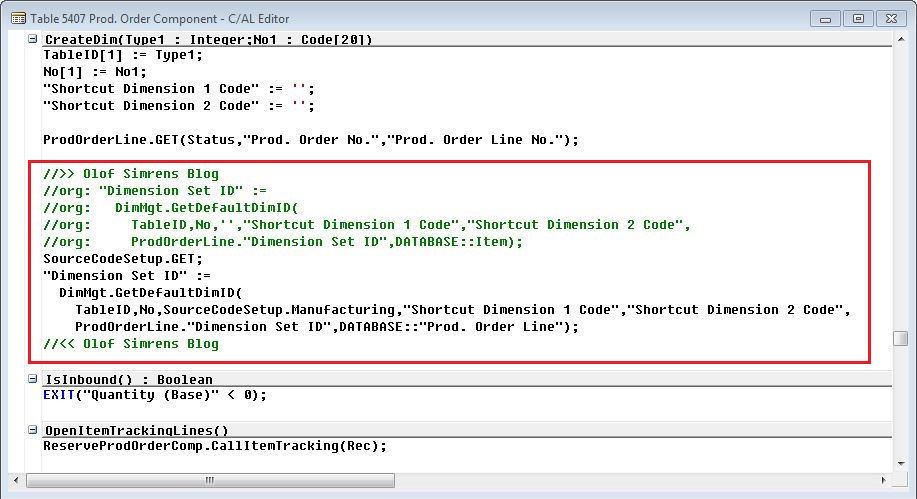
ProdOrderComponentsCodeChange

This is it!

Now we have a system that allow us to setup (through the default dimension priorities) if we want the production order components to have the dimensions from their default dimensions or replace the same dimensions inherited from the production order line. Nice! 🙂

Share this:

  • Share on Facebook (Opens in new window) Facebook
  • Share on X (Opens in new window) X

Related


Discover more from Olof Simren - Microsoft Dynamics 365 Business Central Blog

Subscribe to get the latest posts sent to your email.

Tags: ComponentsDevelopmentDimension PrioritiesDimension Set IDDimensionsProduction
1 Comment
Share
3

About Olof Simren

I am a Microsoft Dynamics NAV and 365 Business Central Expert, I started implementing Microsoft Dynamics NAV in 2002, back then it was called Navision Attain. Throughout the years there has been many exciting implementations in different parts of the world, all of them with different challenges but with one common theme; manufacturing. As a consultant, I bring over 20 years of experience in implementing Microsoft Dynamics NAV and 365 Business Central within manufacturing and distribution companies. The services I offer includes project management, consultation, development and training. Feel free to contact me if you need help with anything related to Microsoft Dynamics NAV or 365 Business Central. I work through my company Naviona where I team up with other skilled Microsoft Dynamics NAV and 365 Business Central Experts.

You also might be interested in

Production Lead Time using Routings

Jun 10, 2014

The production lead time if you are using routings in[...]

Total Cost Allocation for Multiple Outputs

Jul 29, 2014

To allocate the total costs posted against a production order[...]

Add Fields to the Item Tracking Lines

Jun 7, 2016

This blog post is to describe how fields can be[...]

1 Comment

Leave your reply.
  • Michael Opatrny
    · Reply

    December 8, 2016 at 8:09 AM

    Worked great – thanks for the code references!

Leave a Reply

Your email is safe with us.
Cancel Reply

Subscribe to My Blog via Email

Check Out My Apps in AppSource

My Dynamics NAV Partner

Naviona, LLC

Categories

  • Assembly (3)
  • Development (35)
  • Finance (14)
  • General (28)
  • Inventory (25)
  • Manufacturing (37)
  • Miscellaneous (28)
  • Purchase (10)
  • Sales (11)
  • Warehouse (7)

Tags

.net Add-in AI AppSource Assembly Assembly BOM CAL Capacity Consumption Convergence 2015 EMEA Copilot Costs Customer Development Dimensions Excel Finance General Ledger Inventory Item KCP Dynamics MRP NAV 2013 NAV 2015 NAV 2016 Output Planning Production Production BOM Production Orders Purchase Orders Quality Reports Routing Sales Order Scrap Security Stockkeeping Unit Subcontracting Task List Warehouse Warehouse Put-away Warehouse Receipt Warehouse Shipment Work Center

Recent Posts

  • Quality Management in Business Central Version 28
  • Business Central Configuration Audit using Vibe Coding
  • Copilot in Planning Parameter Worksheet
  • Copilot in Planning Worksheet
  • Copilot Inventory Queries
  • Record Deletion Tool for Business Central in AppSource
  • Reopen Finished Production Orders
  • XML Buffer and CSV Buffer Tables
  • Functionality Improvements in NAV 2017
  • Reversing Production Output and Consumption

Categories

  • Assembly
  • Development
  • Finance
  • General
  • Inventory
  • Manufacturing
  • Miscellaneous
  • Purchase
  • Sales
  • Warehouse

Contact Us

We're currently offline. Send us an email and we'll get back to you, asap.

Send Message

Categories

  • Assembly (3)
  • Development (35)
  • Finance (14)
  • General (28)
  • Inventory (25)
  • Manufacturing (37)
  • Miscellaneous (28)
  • Purchase (10)
  • Sales (11)
  • Warehouse (7)

Tags

.net Add-in AI AppSource Assembly Assembly BOM CAL Capacity Consumption Convergence 2015 EMEA Copilot Costs Customer Development Dimensions Excel Finance General Ledger Inventory Item KCP Dynamics MRP NAV 2013 NAV 2015 NAV 2016 Output Planning Production Production BOM Production Orders Purchase Orders Quality Reports Routing Sales Order Scrap Security Stockkeeping Unit Subcontracting Task List Warehouse Warehouse Put-away Warehouse Receipt Warehouse Shipment Work Center

Recent Posts

  • Quality Management in Business Central Version 28
  • Business Central Configuration Audit using Vibe Coding
  • Copilot in Planning Parameter Worksheet
  • Copilot in Planning Worksheet
  • Copilot Inventory Queries
  • Record Deletion Tool for Business Central in AppSource
  • Reopen Finished Production Orders
  • XML Buffer and CSV Buffer Tables
  • Functionality Improvements in NAV 2017
  • Reversing Production Output and Consumption

Recent Comments

  • Olof on Business Central Configuration Audit using Vibe Coding
  • Andrew Trayfoot on Business Central Configuration Audit using Vibe Coding
  • Barrett Allen on Reopen Finished Production Orders
  • Kateryna on Business Central Configuration Audit using Vibe Coding
  • Takeshi Setoya on Reopen Finished Production Orders
  • Steve on Consignment Inventory
  • Olof Simren on Copilot in Planning Worksheet
  • Omaer Amjad on Copilot in Planning Worksheet

© 2026 · Olof Simren

  • Home
  • About Me
  • Contact Me
  • Downloads
  • White Papers
  • Web Sites
  • Post List
  • Articles
  • FAQ
Prev Next