• Home
  • About Me
  • Contact Me
  • Downloads
  • White Papers
  • Web Sites
  • Post List
  • Articles
  • FAQ

Olof Simren - Microsoft Dynamics 365 Business Central Blog

  • Home
  • About Me
  • Contact Me
  • Downloads
  • White Papers
  • Web Sites
  • Post List
  • Articles
  • FAQ

Microsoft OneNote Integration with Dynamics NAV

June 24, 2014 Posted by Olof Simren General, Miscellaneous 7 Comments

I have never used Microsoft OneNote that much, never really seen a need for it (I usually just have my notes in Word). So, when Microsoft announced that there will be a OneNote integration with Dynamics NAV last year I didn’t think that much about it. But when I finally tried it out myself I was very impressed. I saw a very usable tool for both capturing comments/files related to entities NAV and for doing company specific instructions for the different parts of the application.

The OneNote notes can be related to individual records or to a page in Dynamics NAV.

Notes that are related to a page can be accessed from each page under the help menu (or by Ctrl+Shift+F1). The intention of the page notes is to create company specific help notes and instructions (something like how to enter new items).

OneNote-Page-Notes-Dynamics-NAV

Notes that are related to records are accessed with the OneNote action item that already exists on the ribbons (or by Alt+F7). The intention of the record notes are to capture notes, pictures, movies, files, etc. related to the entity.
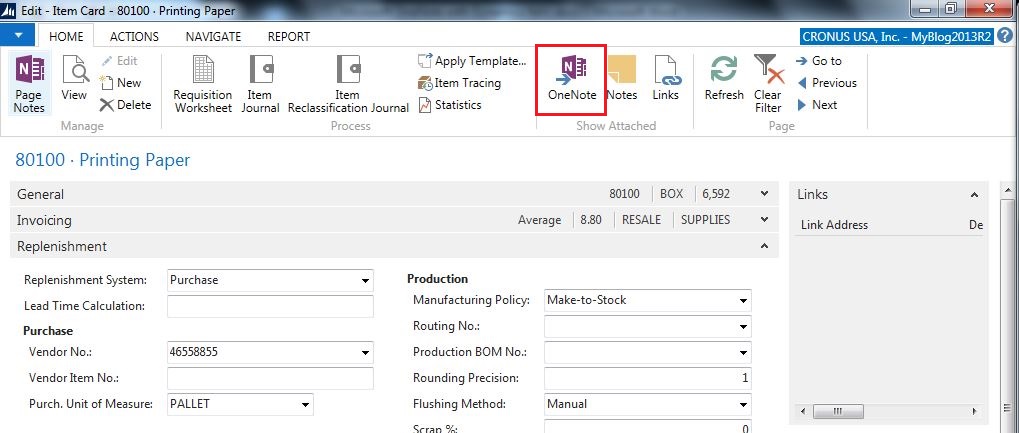
OneNote-Record-Notes-In-Ribbon-Dynamics-NAV

The nice thing with the OneNote integration is that when you click the OneNote page action it opens OneNote and resize Dynamics NAV to fit both of them on the screen next to each other, even if your NAV pages are maximized (at least that is what it is doing on my computer, think it is native OneNote functionality). Then when opening different records or scrolling through records in a list page the different OneNote’s are automatically displayed. Sweet!! 🙂

OneNote-And-Dynamics-NAV-Side-By-Side

You can drag and drop files into a OneNote note, when doing this you get a dialog asking if you want to insert a copy of the file or link to it. Inserting files like this will allow everybody that has access to the Notebook to open the file. Watch out ZetaDocs! 🙂
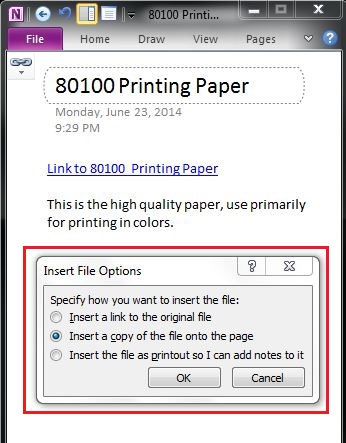
Insert-File-To-OneNote-Dynamics-NAV

If I get to pick between linking documents using the good old Links functionality or using OneNote my choice will be OneNote because I think it is more visible and the users do not have to worry about where the file you link to reside. If I get to pick between using the good old Notes functionality or using OneNote my choice will be OneNote because it is so much more than just text. Score; OneNote vs. Good Old NAV functionality, 2 – 0. 🙂

During implementations I always ask myself; how would I like to have it done if it was my company implementing Dynamics NAV? The answer in this case would be to utilize OneNote. Going forward I think I would recommend OneNote for both company specific instructions about how to enter data in Dynamics NAV and to capture comments and files relate to records such drawings and manuals for items, etc… Assuming OneNote is and option.

The setup where you define the OneNote notebooks are in the profiles, this itself makes it possible to have different instructions for different profiles. Also quite nice I think….

Dynamics-NAV-OneNote-Integration-Setup

Note; you probably want to have those folders on a server that all users have access to and being backed up frequently.

Dynamics NAV then creates one OneNote file per record type in the defined folders.

Dynamics-NAV-Record-Notes-FilesThe OneNote integration is easy to setup and easy to work with. I think it is a great addition to Dynamics NAV.


Share this:

  • Share on Facebook (Opens in new window) Facebook
  • Share on X (Opens in new window) X

Related


Discover more from Olof Simren - Microsoft Dynamics 365 Business Central Blog

Subscribe to get the latest posts sent to your email.

Tags: IntegrationOneNote
7 Comments
Share
2

About Olof Simren

I am a Microsoft Dynamics NAV and 365 Business Central Expert, I started implementing Microsoft Dynamics NAV in 2002, back then it was called Navision Attain. Throughout the years there has been many exciting implementations in different parts of the world, all of them with different challenges but with one common theme; manufacturing. As a consultant, I bring over 20 years of experience in implementing Microsoft Dynamics NAV and 365 Business Central within manufacturing and distribution companies. The services I offer includes project management, consultation, development and training. Feel free to contact me if you need help with anything related to Microsoft Dynamics NAV or 365 Business Central. I work through my company Naviona where I team up with other skilled Microsoft Dynamics NAV and 365 Business Central Experts.

7 Comments

Leave your reply.
  • Andri Wianto
    · Reply

    June 24, 2014 at 9:03 PM

    I at the first moment, the same like you, did not find any need to use OneNote.
    But once I read this, I feel that this is what the users often looking for.

    Thanks, Olof for pointing that out!

  • Hannah Horning
    · Reply

    June 26, 2014 at 9:04 AM

    I’ve always been a fan of using OneNote and think it is a great tool with a ton of potential. It is widely underused, so I’m excited to see that NAV and OneNote are integrated.

    Thanks for the article!

  • Shonna Justin
    · Reply

    June 27, 2014 at 3:54 PM

    This shows that One Note is linked to Dynamics NAV; is it or can it be linked to Dynamics AX 2012?

    Thanks!

    • Olof Simren
      · Reply

      Author
      June 27, 2014 at 5:28 PM

      Good question; I don’t think so. But I might be wrong, I am not that familiar with AX.

  • Geovanny
    · Reply

    July 7, 2014 at 3:13 PM

    A couple of things should be noted:
    This is not a web enabled feature. If you are using web client from far away, they will not be mapped of course.
    Next the size of the file will become big, take in to account corruption as One note is not a stable product database. I’m sure you can google many fixes and add-ons to attempt to recover corrupted information.
    Next I suggest not mapping a drive letter but using UNC (Universal Naming Convention).
    It’s better to work with \\Domain\SharedNotes\NAVfolder
    versus N:\NAVFolder
    Some users will have N: to a different device/harddrive/folder which will cause other users not to have access to it. I learned this a while ago with the old LINK (Paper) have started with.
    Good luck and take some caution.

  • Mark
    · Reply

    November 25, 2015 at 9:30 AM

    I love all of the integration and features that you have detailed, would it be possible for you to detail how it is actually setup as i would really like to get this working.

    • Olof Simren
      · Reply

      Author
      November 25, 2015 at 10:18 AM

      Hi Mark,
      Thanks for your comment.
      There is not much more setup than what is described in this blog post.
      You activate it on the profiles (just like described above), and then you need to make sure your user is using this profile (this you do in the user personalization table).
      OneNote needs to be installed of-course.
      Maybe it is the user personalization that you are missing? Just my guess.

      /Olof

Leave a Reply

Your email is safe with us.
Cancel Reply

Subscribe to My Blog via Email

Check Out My Apps in AppSource

My Dynamics NAV Partner

Naviona, LLC

Categories

  • Assembly (3)
  • Development (35)
  • Finance (14)
  • General (28)
  • Inventory (25)
  • Manufacturing (37)
  • Miscellaneous (28)
  • Purchase (10)
  • Sales (11)
  • Warehouse (7)

Tags

.net Add-in AI AppSource Assembly Assembly BOM CAL Capacity Consumption Convergence 2015 EMEA Copilot Costs Customer Development Dimensions Excel Finance General Ledger Inventory Item KCP Dynamics MRP NAV 2013 NAV 2015 NAV 2016 Output Planning Production Production BOM Production Orders Purchase Orders Quality Reports Routing Sales Order Scrap Security Stockkeeping Unit Subcontracting Task List Warehouse Warehouse Put-away Warehouse Receipt Warehouse Shipment Work Center

Recent Posts

  • Quality Management in Business Central Version 28
  • Business Central Configuration Audit using Vibe Coding
  • Copilot in Planning Parameter Worksheet
  • Copilot in Planning Worksheet
  • Copilot Inventory Queries
  • Record Deletion Tool for Business Central in AppSource
  • Reopen Finished Production Orders
  • XML Buffer and CSV Buffer Tables
  • Functionality Improvements in NAV 2017
  • Reversing Production Output and Consumption

Categories

  • Assembly
  • Development
  • Finance
  • General
  • Inventory
  • Manufacturing
  • Miscellaneous
  • Purchase
  • Sales
  • Warehouse

Contact Us

We're currently offline. Send us an email and we'll get back to you, asap.

Send Message

Categories

  • Assembly (3)
  • Development (35)
  • Finance (14)
  • General (28)
  • Inventory (25)
  • Manufacturing (37)
  • Miscellaneous (28)
  • Purchase (10)
  • Sales (11)
  • Warehouse (7)

Tags

.net Add-in AI AppSource Assembly Assembly BOM CAL Capacity Consumption Convergence 2015 EMEA Copilot Costs Customer Development Dimensions Excel Finance General Ledger Inventory Item KCP Dynamics MRP NAV 2013 NAV 2015 NAV 2016 Output Planning Production Production BOM Production Orders Purchase Orders Quality Reports Routing Sales Order Scrap Security Stockkeeping Unit Subcontracting Task List Warehouse Warehouse Put-away Warehouse Receipt Warehouse Shipment Work Center

Recent Posts

  • Quality Management in Business Central Version 28
  • Business Central Configuration Audit using Vibe Coding
  • Copilot in Planning Parameter Worksheet
  • Copilot in Planning Worksheet
  • Copilot Inventory Queries
  • Record Deletion Tool for Business Central in AppSource
  • Reopen Finished Production Orders
  • XML Buffer and CSV Buffer Tables
  • Functionality Improvements in NAV 2017
  • Reversing Production Output and Consumption

Recent Comments

  • Olof on Business Central Configuration Audit using Vibe Coding
  • Andrew Trayfoot on Business Central Configuration Audit using Vibe Coding
  • Barrett Allen on Reopen Finished Production Orders
  • Kateryna on Business Central Configuration Audit using Vibe Coding
  • Takeshi Setoya on Reopen Finished Production Orders
  • Steve on Consignment Inventory
  • Olof Simren on Copilot in Planning Worksheet
  • Omaer Amjad on Copilot in Planning Worksheet

© 2026 · Olof Simren

  • Home
  • About Me
  • Contact Me
  • Downloads
  • White Papers
  • Web Sites
  • Post List
  • Articles
  • FAQ
Prev Next