• Home
  • About Me
  • Contact Me
  • Downloads
  • White Papers
  • Web Sites
  • Post List
  • Articles
  • FAQ

Olof Simren - Microsoft Dynamics 365 Business Central Blog

  • Home
  • About Me
  • Contact Me
  • Downloads
  • White Papers
  • Web Sites
  • Post List
  • Articles
  • FAQ

Field Level Security using Events in Dynamics NAV 2016

March 11, 2016 Posted by Olof Simren Development, General, Miscellaneous 14 Comments

One of the cool new features in Microsoft Dynamics NAV 2016 is the options to use Events.

Through events you can create functions that are published and subscribe to them in other objects. The great part here is that Microsoft have incorporated a long list of published functions as part of the standard application which can be subscribed to in custom code. This will simplify maintaining and upgrading the objects since modifications can be done completely separated from the standard objects.

To demonstrate this new feature I have programmed a simple field level security add-on (maybe add-on is the wrong word, but at least something that can be added to the standard Dynamics NAV 2016 application to control who are allowed to modify certain fields).

Field level security is something that is missing in standard NAV and almost always something that is discussed during implementations, so I thought this was a good example of how to use Events in NAV 2016 (kind of killing two birds with one stone 🙂 ).

The overall concept for this is to have two new tables where we can setup what fields that are restricted to only be modified by certain users and then to use the triggers that exists in codeunit 1 to check the data before it is committed to the database (by simply comparing restricted fields on the old record with the new record).

It is important to know that this solution will not prevent users from seeing the data in the fields but it can be used to define who is allowed to change the value of the fields. If you want to prevent users from seeing the fields then the property called AccessByPermission on the fields could be used (but that’s another topic and maybe a future blog post).

In my example I have two new tables; one called Restricted Field and the other called Restricted Field User Access (for lack of a better name). The objects can be downloaded in the download section and used as reference.

The Restricted Field table is used to define what fields that should be restricted from the general user, it has a table no. and field no. field (and their names as non-editable flowfields to make it easier for the user).

Restricted-Fields-Dynamics-NAV-2016

The next table, Restricted Field User Access (available from the User Access button in the ribbon of the Restricted Field page), is then where you define what users that are allowed to change each of the restricted fields.

Restricted-Fields-User-Access-Dynamics-NAV-2016

In the above example I have defined that the Blocked field in the Item table is a restricted field and only the user OSIMREN can modify it. The Restricted Field User Access table obviously have the table no. and field no. as part of the primary key (as well as the user id).

Now we have the data structure to use, it is time to write the code (the fun stuff 🙂 ).

If you have been programming in Dynamics NAV for a while you are probably aware of the OnDatabase functions that runs when records are inserted, modified, deleted or renamed (they run just prior to the data being committed to the database). Those functions have in Dynamics NAV 2016 been extended with calls to new OnAfterOnDatabase functions (highlighted below).

OnDatabase-Triggers-Codeunit-1-Dynamics-NAV-2016

Those new functions are created with the property Event = Publisher and EventType = Integration. This means that the functions are published and can be subscribed to by other functions in the application.
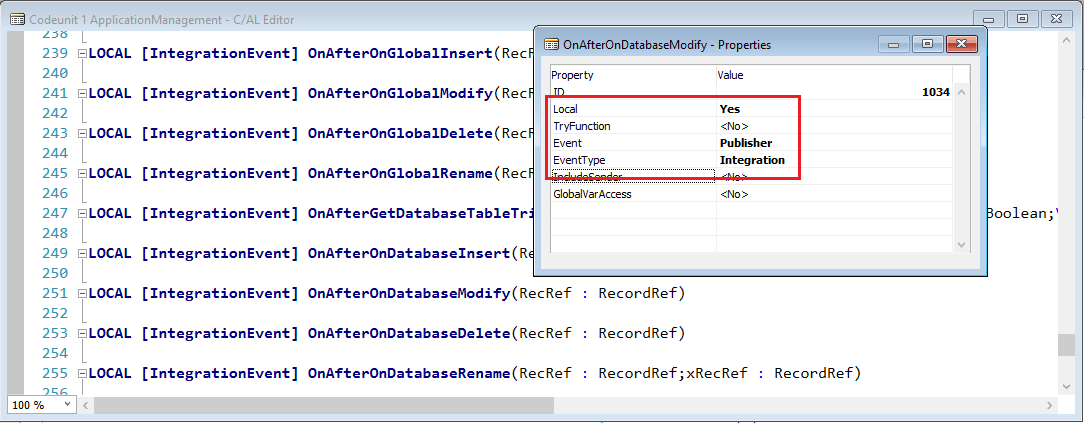
OnAfterOnDatabaseModify-Codeunit-1-Dynamics-NAV-2016

The EventType property have two values; business and integration. The business event type should be used if the function is formally defined and will not change in the future, the integration event should be used when the function potentially can change. At least that is my interpretation of Microsoft’s description of the difference. I will be using the integration option. 🙂

It is worth knowing that there is a third type of event; trigger events. Those are predefined events that gets published by the runtime for the table and page triggers. This means that you can also subscribe to the OnInsert, OnModify, OnDelete, etc.. of all the tables (and also for field validation code). So, theoretically there should be no need to write any code in the table triggers of the standard objects anymore. Quite a big change to how you can write code I would say, but a super nice addition.

We now create a new codeunit with functions that are subscribing to the published functions in codeunit 1. The functions in our new codeunit are then called each time the published function is called.

I my example I created a Restricted Fields Mgt. codeunit with the following functions; OnAfterGetDatabaseTableTriggerSetup, OnAfterOnDatabaseDelete, OnAfterOnDatabaseInsert, OnAfterOnDatabaseModify, OnAfterOnGlobalRename that are all subscribing to the corresponding functions in codeunit 1. The subscription is done by setting the Event property to Subscriber and in the EventPublisherObject property select the object (codeunit 1) and in the EventFunction select the published function to subscribe to.

Subscriber-Functions-New-Codeunit-Dynamics-NAV-2016

We also make the codeunit a single instant codeunit and put the two new tables in it as global variables. This will reduce the number of reads that NAV will have to do from the database since the two tables will then remain in memory during the client session. This is the same way the change log codeunit is structured.

Single-Instant-Restricted-Fields-Codeunit-Dynamics-NAV-2016

The code in the OnAfterGetDatabaseTableTriggerSetup function just returns true if the record that is being changes is in a table that have a restricted field. Returning true will make NAV call the OnAfterOnDatabase functions, otherwise those are not called (same concept as the change log again).
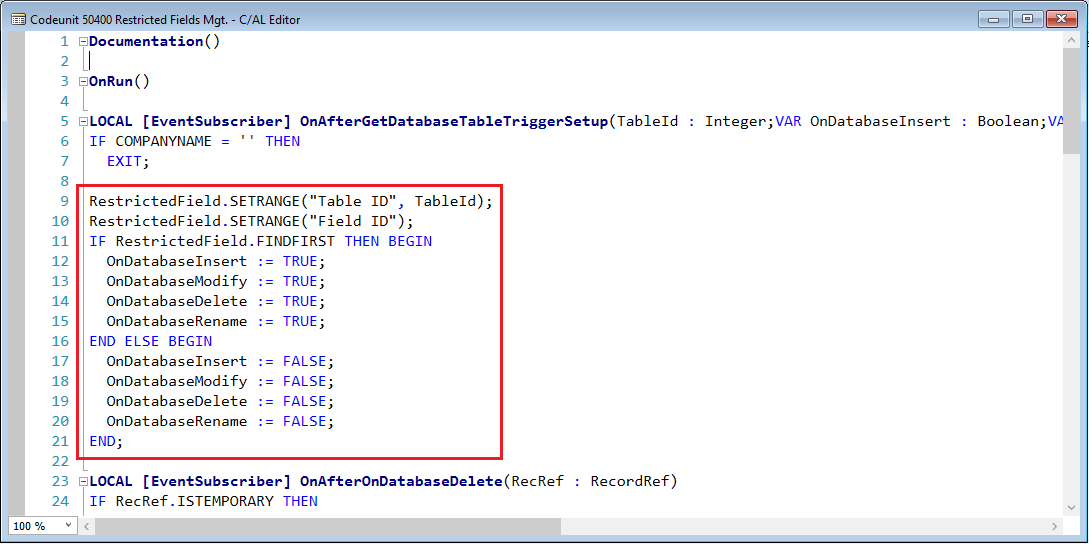
OnAfterGetDatabaseTableTriggerSetup-Restricted-Fields-Codeunit-Dynamics-NAV-2016

Then in the other functions we just compare the value of the restricted fields on the record being changed with the record that is in the database. We do this using RecordRef and FieldRef variables, the key here is that the record we get from the database is the ‘unmodified’ record that we can compare with, and we are only comparing the restricted fields.
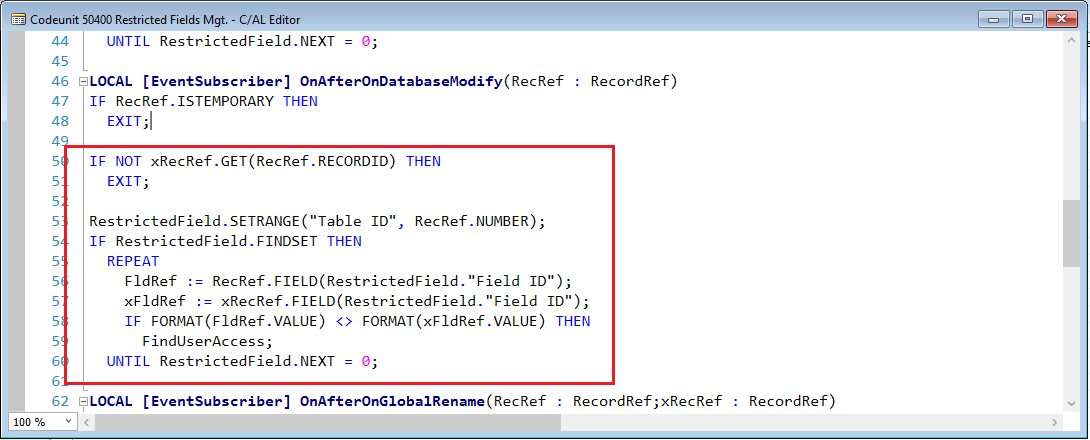
OnAfterDatabaseModify-Restricted-Fields-Codeunit-Dynamics-NAV-2016

And if the value is different we check the user access like below (if the user is not setup to allow modifying the field NAV will throw an error znd rollback the change).
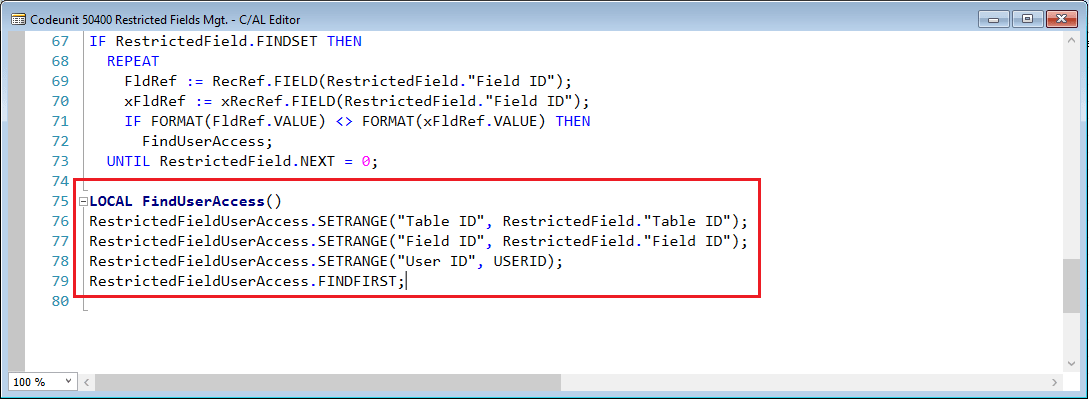
FindUserAccess-Restricted-Fields-Codeunit-Dynamics-NAV-2016

That’s it! An application wide feature made without changing a single standard objects. 🙂

Let’s test it; I go to an item and if I try to change the inventory posting group I will get the following error message when the record is about to be committed to the database (it is important to know that it is when the record is a about to be committed and not when the fields is validated, so basically when you close the page).

Field-Permission-Error-Item-Card-Dynamics-NAV-2016

The error message might have a need to be made more user friendly (like including the field name and the value before and after), but I think the above servers the purpose of demonstrating the concept of the Events.

You can download the objects from the downloads section, just keep in mind that the code is for illustration only, you can use it as you want but I leave no warranties.

It is also good to know that you can view all the event subscriptions from the development environment by going to Tools -> Debugger -> Event Subscriptions…

Events are my favorite new feature! Happy Eventing! 🙂

Make sure to share this on social media.

Share this:

  • Share on Facebook (Opens in new window) Facebook
  • Share on X (Opens in new window) X

Related


Discover more from Olof Simren - Microsoft Dynamics 365 Business Central Blog

Subscribe to get the latest posts sent to your email.

Tags: DevelopmentEventsField Level SecurityNAV 2016Security
14 Comments
Share
9

About Olof Simren

I am a Microsoft Dynamics NAV and 365 Business Central Expert, I started implementing Microsoft Dynamics NAV in 2002, back then it was called Navision Attain. Throughout the years there has been many exciting implementations in different parts of the world, all of them with different challenges but with one common theme; manufacturing. As a consultant, I bring over 20 years of experience in implementing Microsoft Dynamics NAV and 365 Business Central within manufacturing and distribution companies. The services I offer includes project management, consultation, development and training. Feel free to contact me if you need help with anything related to Microsoft Dynamics NAV or 365 Business Central. I work through my company Naviona where I team up with other skilled Microsoft Dynamics NAV and 365 Business Central Experts.

You also might be interested in

Add Fields to the Item Tracking Lines

Jun 7, 2016

This blog post is to describe how fields can be[...]

Custom Business Chart Add-In Example for NAV 2013 R2

May 28, 2014

Here is an example of how to create a custom[...]

Custom Progress Bar in Dynamics NAV 2013 R2

May 6, 2014

Here is an example of how you can create a[...]

14 Comments

Leave your reply.
  • Lars
    · Reply

    March 11, 2016 at 10:21 AM

    From one NAV-oholic to another: Thanks for sharing! 🙂

    Really cool idea on how to use the events. And yes, event’s are fund to play with. But wouldn’t it be great if we also could subscribe for field validation trigger events and have the record?

    And now I’m maybe totally in outer space here…, but Microsoft could even create a “codeunit” behind each table automatically subscribing for all field trigger events (both OnBeforeValidate and OnAfterValidate). You could open that codeunit from the table designer and put your code there without touching the actual table. That would be a layer on top of standard with code that runs. In your custom code you should be able to return FALSE in OnBeforeValidate to skip the standard code completely.

    Events are even in it’s current shape a huge leap forward when building integrations. Me like! 🙂

    • Olof Simren
      · Reply

      Author
      March 11, 2016 at 11:08 AM

      Hi Lars,
      Thanks for your comment, I like your codeunit idea.

      I actually think you can subscribe to field validation triggers and you have both the xRec and Rec (and you can modify the Rec as well).
      A function like below in a new codeunit subscribes to OnValidate function of the Description field in the item table, the code runs when validating the field and I am able to modify the record (just like writing the code in the OnValidate trigger of the field in the table).

      [EventSubscriber(Table,27,OnAfterValidateEvent,Description)]
      LOCAL PROCEDURE OnAfterValidateItemDescription@1000000001(VAR Rec@1000000000 : Record 27;VAR xRec@1000000001 : Record 27;CurrFieldNo@1000000002 : Integer);
      BEGIN
      MESSAGE(‘You have changed the Description to ‘ + Rec.Description);
      Rec.”Search Description” := ‘Modified through Events’;
      END;

      • Lars
        · Reply

        March 11, 2016 at 1:36 PM

        Yes. That’s an idea, but that happens after the actual modify of the record. It shouldn’t be to hard to accomplish for Microsoft since it’s possible to declare a publishing function.

        We’ll have to wait and see. This is just a first version of the concept.

        • Lars
          · Reply

          March 31, 2016 at 5:08 AM

          Now I see I didn’t read your last response thoroughly enough. The OnBeforeValidateEvent and OnAfterValidateEvent are real beauties 🙂 They do exactly what I want them to do.

  • Eamonn
    · Reply

    March 11, 2016 at 11:01 AM

    Thanks for exploring Olof & sharing! Your blogs are always interesting & informative. Eamonn

  • Andri Wianto
    · Reply

    May 20, 2016 at 2:39 AM

    Well written. Thanks!

  • Gbenga
    · Reply

    July 2, 2016 at 10:33 PM

    Hi olof ,
    Your work on Field Level Security using Events in Dynamics NAV 2016 gave me all I need to know about the event publishing and integration on the 2016 development. Thanks your blog has always been very helpful, well written and detailed.

  • indra abdy
    · Reply

    July 3, 2016 at 11:08 PM

    Hi Olof,

    Many thanks for the idea !!!
    i’m waiting for your next idea about “prevent users from seeing the fields then the property called AccessByPermission” ….

  • Suresh Miglani
    · Reply

    February 8, 2017 at 6:17 AM

    Hello Simren,

    Thanks for this amazing blog, its help me to get solution on things. I have tried FOB of “field level security” and wondering if it could contain value of fields.

    I.e. If we want to restrict any user to use specific 2 or 3 location code out of 10, rest location code can be used by that user.

    Regards
    Suresh
    Functional Consultant

    • Olof Simren
      · Reply

      Author
      February 9, 2017 at 2:36 PM

      Hi Suresh,
      It does not do this, it just controls what fields that can be change by what user (not what records).
      It could theoretically be extended to do that (adding something like a record id to the setup).

      Thanks for you comment!

      /Olof

  • Tomáš Kapitán
    · Reply

    August 9, 2017 at 4:36 PM

    Hi Olof,
    I found a problem with your sollution – this addon make the change log broken. The sollution is remove the ELSE part from the OnAfterGetDatabaseTableTriggerSetup event.

    It has to be same as “IntegrationManagement.GetDatabaseTableTriggerSetup” in CU1. If you have the ELSE part where you set the variables to FALSE, then you rewrite TRUE value written by Change Log setup.

    Tomáš

  • Jeff Mantz
    · Reply

    September 28, 2018 at 9:07 AM

    We implemented the code and it works great except we ran into the same issue as Tomáš. It took us quite awhile to figure out the cause of the change log issue. Once we isolated it to this modification I came back to this page and saw Tomáš’s post providing a solution of removing the ELSE statement. Once we did that change log worked again. It would be helpful to update the blog post as not everyone reads all the way down to the comments.

  • Miguel Angel Cornejo
    · Reply

    December 19, 2018 at 10:50 AM

    Nice solution Olof, ialso added the permission set access, so we can give access by permission set

    RestrictedFieldPermissions Table
    Enabled Field No. Field Name Data Type Length Description
    Yes 1 Table ID Integer
    Yes 2 Field ID Integer
    Yes 3 Role ID Code 20
    Yes 4 Role Name Text 30

    LOCAL FindPermissionSetAccess()
    CLEAR(LRoleId);
    AccessControl.RESET;
    AccessControl.SETRANGE(“User Security ID”,USERSECURITYID);
    AccessControl.SETRANGE(“Role ID”,’SUPER’);
    IF AccessControl.FINDFIRST THEN
    EXIT;

    IF AccessControl.FINDSET THEN BEGIN
    REPEAT
    LRoleId += AccessControl.”Role ID” + ‘|’;
    UNTIL AccessControl.NEXT = 0;
    LRoleId := DELCHR(LRoleId,’>’,’|’);
    END;

    RestrictedFieldPermissions.RESET;
    RestrictedFieldPermissions.SETRANGE(“Table ID”, RestrictedField.”Table ID”);
    RestrictedFieldPermissions.SETRANGE(“Field ID”, RestrictedField.”Field ID”);
    RestrictedFieldPermissions.SETFILTER(“Role ID”,LRoleId);
    RestrictedFieldPermissions.FINDFIRST;

  • Anonymous
    · Reply

    December 22, 2021 at 5:47 AM

    Hi Olof,

    Great code but it has bug.

    The code in OnAfterGetDatabaseTableTriggerSetup disables the change log insert/modify from all the tables that are active and not defined in RestrictedField table. Chagen log logic is in cu 1 OnDatabaseInsert, OnDatabaseModify ChangeLogMgt.LogInsertion(RecRef);

    Regards,
    Vasilis Charalambous

Leave a Reply

Your email is safe with us.
Cancel Reply

Subscribe to My Blog via Email

Check Out My Apps in AppSource

My Dynamics NAV Partner

Naviona, LLC

Categories

  • Assembly (3)
  • Development (35)
  • Finance (14)
  • General (28)
  • Inventory (25)
  • Manufacturing (37)
  • Miscellaneous (28)
  • Purchase (10)
  • Sales (11)
  • Warehouse (7)

Tags

.net Add-in AI AppSource Assembly Assembly BOM CAL Capacity Consumption Convergence 2015 EMEA Copilot Costs Customer Development Dimensions Excel Finance General Ledger Inventory Item KCP Dynamics MRP NAV 2013 NAV 2015 NAV 2016 Output Planning Production Production BOM Production Orders Purchase Orders Quality Reports Routing Sales Order Scrap Security Stockkeeping Unit Subcontracting Task List Warehouse Warehouse Put-away Warehouse Receipt Warehouse Shipment Work Center

Recent Posts

  • Quality Management in Business Central Version 28
  • Business Central Configuration Audit using Vibe Coding
  • Copilot in Planning Parameter Worksheet
  • Copilot in Planning Worksheet
  • Copilot Inventory Queries
  • Record Deletion Tool for Business Central in AppSource
  • Reopen Finished Production Orders
  • XML Buffer and CSV Buffer Tables
  • Functionality Improvements in NAV 2017
  • Reversing Production Output and Consumption

Categories

  • Assembly
  • Development
  • Finance
  • General
  • Inventory
  • Manufacturing
  • Miscellaneous
  • Purchase
  • Sales
  • Warehouse

Contact Us

We're currently offline. Send us an email and we'll get back to you, asap.

Send Message

Categories

  • Assembly (3)
  • Development (35)
  • Finance (14)
  • General (28)
  • Inventory (25)
  • Manufacturing (37)
  • Miscellaneous (28)
  • Purchase (10)
  • Sales (11)
  • Warehouse (7)

Tags

.net Add-in AI AppSource Assembly Assembly BOM CAL Capacity Consumption Convergence 2015 EMEA Copilot Costs Customer Development Dimensions Excel Finance General Ledger Inventory Item KCP Dynamics MRP NAV 2013 NAV 2015 NAV 2016 Output Planning Production Production BOM Production Orders Purchase Orders Quality Reports Routing Sales Order Scrap Security Stockkeeping Unit Subcontracting Task List Warehouse Warehouse Put-away Warehouse Receipt Warehouse Shipment Work Center

Recent Posts

  • Quality Management in Business Central Version 28
  • Business Central Configuration Audit using Vibe Coding
  • Copilot in Planning Parameter Worksheet
  • Copilot in Planning Worksheet
  • Copilot Inventory Queries
  • Record Deletion Tool for Business Central in AppSource
  • Reopen Finished Production Orders
  • XML Buffer and CSV Buffer Tables
  • Functionality Improvements in NAV 2017
  • Reversing Production Output and Consumption

Recent Comments

  • Olof on Business Central Configuration Audit using Vibe Coding
  • Andrew Trayfoot on Business Central Configuration Audit using Vibe Coding
  • Barrett Allen on Reopen Finished Production Orders
  • Kateryna on Business Central Configuration Audit using Vibe Coding
  • Takeshi Setoya on Reopen Finished Production Orders
  • Steve on Consignment Inventory
  • Olof Simren on Copilot in Planning Worksheet
  • Omaer Amjad on Copilot in Planning Worksheet

© 2026 · Olof Simren

  • Home
  • About Me
  • Contact Me
  • Downloads
  • White Papers
  • Web Sites
  • Post List
  • Articles
  • FAQ
Prev Next