• Home
  • About Me
  • Contact Me
  • Downloads
  • White Papers
  • Web Sites
  • Post List
  • Articles
  • FAQ

Olof Simren - Microsoft Dynamics 365 Business Central Blog

  • Home
  • About Me
  • Contact Me
  • Downloads
  • White Papers
  • Web Sites
  • Post List
  • Articles
  • FAQ

Write C/AL Code in Excel

September 22, 2014 Posted by Olof Simren Development, Miscellaneous 9 Comments

This is something that I did some days ago and I thought it was creative enough to be worth a blog post.

The task was to do a onetime mass update to the item records. There were more than 85.000 items in the company and they all had two production bin fields that needed to be updated according to a table with some rules provided in Excel. For items starting with ’10’ the two fields should be ‘RAW’ and ‘RAW’, for items starting with ‘11’ the two fields should be ‘TREATED’ and ‘CUT’, etc. like the below table, nothing strange.

Excel-Sheet-With-Bins

Now, there are many ways of doing this;

If it was not that many categories and it was in a 2009 or earlier version I would just run the item table in the object designer, set a filter and use the Replace All function for each of the categories. But since it was quite a few categories and in a 2013 R2 version, then using Replace All will not work.

The other option would be to create a new table, copy/paste the value from Excel into the table and write a function to update the items based on the records in the new table. That would be an ok approach and quite quick. The downside is that you need to create a table just for a onetime change.

The third approach is to write a function that loops through all the item records (or use a report) and within the loop create an IF statement for each of the categories provided in the spreadsheet. The downside of this is all the IF statements you ned to write (and the worst thing I know is to write the same code over and over again).

This is where Excel comes into play. With some creativity in Excel you can get all those IF statements created for you and all you have to do is to copy/paste it back into the C/AL code and run the function. 🙂

Here is how it can be done;

Add the code for the IF statement with the modifications to the records in a cell in the Excel spreadsheet and where the item number part and bin codes are put something that can be replaced by Excel. In the case below I used ‘%1’, ‘%2’ and ‘%3’ (why not use some NAV syntax :-)).
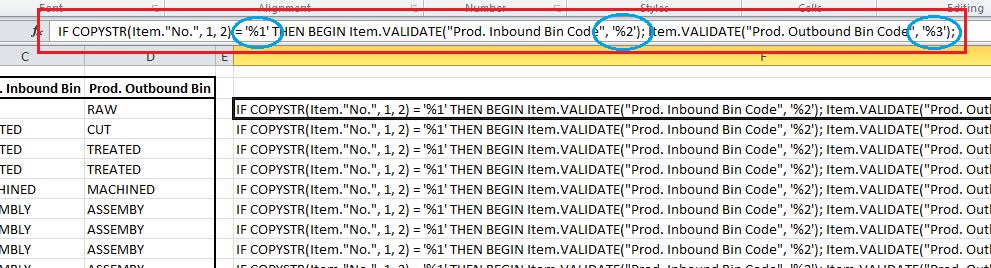
CAL-Code-In-Excel

Then in another cell in the Excel spreadsheet, create a formula and use the SUBSTITUTE function three times to replace the ‘%1’, ‘%2’ and ‘%3’ with the item number parts and bin codes. This then creates the proper C/AL code for the IF statement, just drag it down and you have all the IF statements you need.

Substitute-Parts-Of-Code-For-Bins

This can then be copy/pasted into Dynamics NAV and placed within a loop like below (or place it a report).

CAL-Code-Copied-From-Excel

Agree, it looks a bit weird to have the IF statement, the fields and the MODIFY statement all on the same row, but since this is a onetime update to the records it is less of a problem. Since we now, starting in version 2013, can have 240 characters on a single line of C/AL code this approach could be very useful.

Then it is just to run the function and all the records gets updated.

If, for some reasons, the bins are going to be changed again, I just change them in Excel and copy/paste the code into Dynamics NAV again and run the function.

Quite nice and creative I think. I will most likely use this approach again if I get the same request; it is quick and eliminates having to manually write multiple lines with the same code.

Share this:

  • Share on Facebook (Opens in new window) Facebook
  • Share on X (Opens in new window) X

Related


Discover more from Olof Simren - Microsoft Dynamics 365 Business Central Blog

Subscribe to get the latest posts sent to your email.

Tags: CALDevelopmentExcel
9 Comments
Share
2

About Olof Simren

I am a Microsoft Dynamics NAV and 365 Business Central Expert, I started implementing Microsoft Dynamics NAV in 2002, back then it was called Navision Attain. Throughout the years there has been many exciting implementations in different parts of the world, all of them with different challenges but with one common theme; manufacturing. As a consultant, I bring over 20 years of experience in implementing Microsoft Dynamics NAV and 365 Business Central within manufacturing and distribution companies. The services I offer includes project management, consultation, development and training. Feel free to contact me if you need help with anything related to Microsoft Dynamics NAV or 365 Business Central. I work through my company Naviona where I team up with other skilled Microsoft Dynamics NAV and 365 Business Central Experts.

You also might be interested in

Kill Sessions in Dynamics NAV

Jan 18, 2015

In the older versions of Microsoft Dynamics NAV where the[...]

Scrap in Production

Jul 16, 2014

Microsoft Dynamics NAV has multiple ways in which you can[...]

Additional Outputs on Production Orders

Mar 24, 2014

Having additional outputs on production orders (sometimes refereed to as[...]

9 Comments

Leave your reply.
  • Andri Wianto
    · Reply

    September 22, 2014 at 11:08 PM

    A creative way! 😀

  • Rafael Rezende
    · Reply

    September 23, 2014 at 12:59 PM

    Hello!

    I do that all the time. Both to create NAV code or SQL queries.

    But intead of Excel, I use https://nimbletext.com

    It’s a fantastic tool to generate code based on text data, you should try it out!

    • Olof Simren
      · Reply

      Author
      September 23, 2014 at 8:07 PM

      Thanks for the tip Rafael! I will have a look at that tool.
      And I thought it was doing something innovative. 🙂

  • AntidotE
    · Reply

    September 26, 2014 at 8:27 AM

    I often use excel in this manner when perform data migration during upgrade projects. 🙂

  • Nuno Silva
    · Reply

    September 29, 2014 at 5:20 AM

    wouldn’t be easier export the data to excel by rapid start, already with the two new fields then make some filters in excel, replace the values and the import the data back to NAV

    • Olof Simren
      · Reply

      Author
      September 29, 2014 at 7:54 AM

      Hi Nuno,
      A very valid alternative!
      If it would be easier or not, it probably depends a bit on what you are used to.
      I think writing the code is easier, it takes away the repetitiveness of having to filter, update, filter, update, and so on.
      And with the number of records and criteria’s, this would most likely be quicker as well.

      Many thanks for your reply!!

  • Leon
    · Reply

    October 13, 2014 at 10:09 PM

    Hi Olof

    I saw some people turning up at my site (NimbleText) due to Rafael’s comment. So I created an example that does the same thing using a NimbleText pattern. You can view it here:

    https://nimbletext.com/Live/566718574/

    (I couldn’t reproduce the solution entirely as I can’t see it all in the screenshots.

    best of luck!
    lb

  • Tarek Demiati
    · Reply

    January 29, 2015 at 12:44 PM

    Nice tool Leon!

    Mainly when you hate re-inventing the wheel by crafting boring RegeX code 😉

    #regex

  • Ruslan
    · Reply

    December 12, 2015 at 5:29 PM

    When we upload rather long list of records, to have as a parcer a lot of if statements is not a very good idea, becouse long list of “if” statements consumes too much time. In this case much better to use “case” statement. Capacity will be much better. It is already tested on practice.
    Best regards,
    Ruslan.

Leave a Reply

Your email is safe with us.
Cancel Reply

Subscribe to My Blog via Email

Check Out Our Apps in AppSource

My Dynamics NAV Partner

Naviona, LLC

Categories

  • Assembly (3)
  • Development (35)
  • Finance (14)
  • General (28)
  • Inventory (24)
  • Manufacturing (36)
  • Miscellaneous (27)
  • Purchase (9)
  • Sales (11)
  • Warehouse (7)

Tags

.net Add-in AI AppSource Assembly Assembly BOM Business Central CAL Capacity Consumption Contact Copilot Costs Customer Development Dimensions Excel Finance Flushing General Ledger Inventory Item Item Tracking Low-Level Code MRP NAV 2015 NAV 2016 Output Planning Production Production BOM Production Orders Purchase Orders Receipts Reporting Reports Routing Sales Sales Order Stockkeeping Unit Subcontracting Task List Warehouse Warehouse Shipment Work Center

Recent Posts

  • Business Central Configuration Audit using Vibe Coding
  • Copilot in Planning Parameter Worksheet
  • Copilot in Planning Worksheet
  • Copilot Inventory Queries
  • Record Deletion Tool for Business Central in AppSource
  • Reopen Finished Production Orders
  • XML Buffer and CSV Buffer Tables
  • Functionality Improvements in NAV 2017
  • Reversing Production Output and Consumption
  • Return Merchandise Authorization (RMA)

Categories

  • Assembly
  • Development
  • Finance
  • General
  • Inventory
  • Manufacturing
  • Miscellaneous
  • Purchase
  • Sales
  • Warehouse

Contact Us

We're currently offline. Send us an email and we'll get back to you, asap.

Send Message

Categories

  • Assembly (3)
  • Development (35)
  • Finance (14)
  • General (28)
  • Inventory (24)
  • Manufacturing (36)
  • Miscellaneous (27)
  • Purchase (9)
  • Sales (11)
  • Warehouse (7)

Tags

.net Add-in AI AppSource Assembly Assembly BOM Business Central CAL Capacity Consumption Contact Copilot Costs Customer Development Dimensions Excel Finance Flushing General Ledger Inventory Item Item Tracking Low-Level Code MRP NAV 2015 NAV 2016 Output Planning Production Production BOM Production Orders Purchase Orders Receipts Reporting Reports Routing Sales Sales Order Stockkeeping Unit Subcontracting Task List Warehouse Warehouse Shipment Work Center

Recent Posts

  • Business Central Configuration Audit using Vibe Coding
  • Copilot in Planning Parameter Worksheet
  • Copilot in Planning Worksheet
  • Copilot Inventory Queries
  • Record Deletion Tool for Business Central in AppSource
  • Reopen Finished Production Orders
  • XML Buffer and CSV Buffer Tables
  • Functionality Improvements in NAV 2017
  • Reversing Production Output and Consumption
  • Return Merchandise Authorization (RMA)

Recent Comments

  • Olof on Business Central Configuration Audit using Vibe Coding
  • Andrew Trayfoot on Business Central Configuration Audit using Vibe Coding
  • Barrett Allen on Reopen Finished Production Orders
  • Kateryna on Business Central Configuration Audit using Vibe Coding
  • Takeshi Setoya on Reopen Finished Production Orders
  • Steve on Consignment Inventory
  • Olof Simren on Copilot in Planning Worksheet
  • Omaer Amjad on Copilot in Planning Worksheet

© 2026 · Olof Simren

  • Home
  • About Me
  • Contact Me
  • Downloads
  • White Papers
  • Web Sites
  • Post List
  • Articles
  • FAQ
Prev Next