• Home
  • About Me
  • Contact Me
  • Downloads
  • White Papers
  • Web Sites
  • Post List
  • Articles
  • FAQ

Olof Simren - Microsoft Dynamics 365 Business Central Blog

  • Home
  • About Me
  • Contact Me
  • Downloads
  • White Papers
  • Web Sites
  • Post List
  • Articles
  • FAQ

Activate Item Tracking for Items with Ledger Entries

June 15, 2014 Posted by Olof Simren Development, Inventory, Miscellaneous 5 Comments

A common request is to activate item tracking (lot numbers and/or serials numbers) for items that already have transactions (item ledger entries). In Microsoft Dynamics NAV you can’t really do this without going ‘behind the scenes’ and tweaking the data.

What I have done a couple of times is to change the check on the item tracking code to only check for open item ledger entries. This way you can adjust the inventory out, change the item tracking code, and then put the inventory back in with the lot and/or serial numbers. This is a one line code change that takes 5 min. All you have to do is to change the TestNoEntriesExist call in the OnValidate trigger of the item tracking code field in the item table to call the TestNoOpenEntriesExist function instead like below.
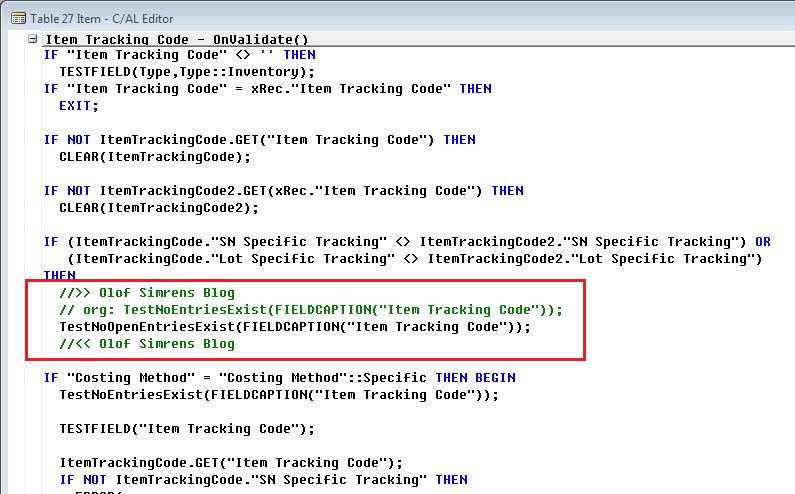
Item-Tracking-Code-Dynamics-NAV

That’s it! 🙂

This is to me the preferred way to do it, but it should only be a workaround, since a closed item ledger entry can be reopened through the application worksheet (so if you do that and apply an item ledger entry without a lot number to one with a lot number you might get into trouble).

Share this:

  • Share on Facebook (Opens in new window) Facebook
  • Share on X (Opens in new window) X

Related


Discover more from Olof Simren - Microsoft Dynamics 365 Business Central Blog

Subscribe to get the latest posts sent to your email.

Tags: DevelopmentInventoryItemLot TrackingSerial Tracking
5 Comments
Share
5

About Olof Simren

I am a Microsoft Dynamics NAV and 365 Business Central Expert, I started implementing Microsoft Dynamics NAV in 2002, back then it was called Navision Attain. Throughout the years there has been many exciting implementations in different parts of the world, all of them with different challenges but with one common theme; manufacturing. As a consultant, I bring over 20 years of experience in implementing Microsoft Dynamics NAV and 365 Business Central within manufacturing and distribution companies. The services I offer includes project management, consultation, development and training. Feel free to contact me if you need help with anything related to Microsoft Dynamics NAV or 365 Business Central. I work through my company Naviona where I team up with other skilled Microsoft Dynamics NAV and 365 Business Central Experts.

You also might be interested in

Alternative Production BOMs and Routings

Jun 14, 2015

Using alternative production BOMs or routings is quite common in[...]

Batch Creation of Warehouse Shipments

May 10, 2015

In one of my previous blog posts about processing shipments[...]

Record Deletion Tool for Business Central in AppSource

Aug 19, 2025

10+ years ago I created a Record Deletion tool for[...]

5 Comments

Leave your reply.
  • Kishor Mistry
    · Reply

    August 26, 2014 at 7:41 AM

    I have done something similar in the past but found that there is another issue in that if you have a sales/purchase order that has been shipped but not invoiced and you activate item tracking then this causes an error when you try to post the invoice later on. You really need to make sure that all shipped items have also been invoiced.

    • Olof Simren
      · Reply

      Author
      August 26, 2014 at 8:12 AM

      Good point!
      Thanks for your comment Kishor.

  • Steve Pena
    · Reply

    September 21, 2020 at 4:29 PM

    Hi Olof,

    We have an item tracking code where SN Specific tracking in NOT marked. We want to turn this on, but cannot, due to item ledger entries.

    It sounds like your fix can apply here. What are your thoughts?

    Thanks!

    Steve

    • Hans
      · Reply

      November 19, 2021 at 8:55 AM

      Steve,

      Did it work?

  • Chris Hetzler
    · Reply

    February 19, 2024 at 2:25 PM

    Looking to do this in BC / Al code, but the logic seems a little different and there is no way to change the base code. So I assume that one would need to plug into the OnValidate logic somehow?

Leave a Reply

Your email is safe with us.
Cancel Reply

Subscribe to My Blog via Email

Check Out My Apps in AppSource

My Dynamics NAV Partner

Naviona, LLC

Categories

  • Assembly (3)
  • Development (35)
  • Finance (14)
  • General (28)
  • Inventory (25)
  • Manufacturing (37)
  • Miscellaneous (28)
  • Purchase (10)
  • Sales (11)
  • Warehouse (7)

Tags

.net Add-in AI AppSource Assembly Assembly BOM CAL Capacity Consumption Convergence 2015 EMEA Copilot Costs Customer Development Dimensions Excel Finance General Ledger Inventory Item KCP Dynamics MRP NAV 2013 NAV 2015 NAV 2016 Output Planning Production Production BOM Production Orders Purchase Orders Quality Reports Routing Sales Order Scrap Security Stockkeeping Unit Subcontracting Task List Warehouse Warehouse Put-away Warehouse Receipt Warehouse Shipment Work Center

Recent Posts

  • Quality Management in Business Central Version 28
  • Business Central Configuration Audit using Vibe Coding
  • Copilot in Planning Parameter Worksheet
  • Copilot in Planning Worksheet
  • Copilot Inventory Queries
  • Record Deletion Tool for Business Central in AppSource
  • Reopen Finished Production Orders
  • XML Buffer and CSV Buffer Tables
  • Functionality Improvements in NAV 2017
  • Reversing Production Output and Consumption

Categories

  • Assembly
  • Development
  • Finance
  • General
  • Inventory
  • Manufacturing
  • Miscellaneous
  • Purchase
  • Sales
  • Warehouse

Contact Us

We're currently offline. Send us an email and we'll get back to you, asap.

Send Message

Categories

  • Assembly (3)
  • Development (35)
  • Finance (14)
  • General (28)
  • Inventory (25)
  • Manufacturing (37)
  • Miscellaneous (28)
  • Purchase (10)
  • Sales (11)
  • Warehouse (7)

Tags

.net Add-in AI AppSource Assembly Assembly BOM CAL Capacity Consumption Convergence 2015 EMEA Copilot Costs Customer Development Dimensions Excel Finance General Ledger Inventory Item KCP Dynamics MRP NAV 2013 NAV 2015 NAV 2016 Output Planning Production Production BOM Production Orders Purchase Orders Quality Reports Routing Sales Order Scrap Security Stockkeeping Unit Subcontracting Task List Warehouse Warehouse Put-away Warehouse Receipt Warehouse Shipment Work Center

Recent Posts

  • Quality Management in Business Central Version 28
  • Business Central Configuration Audit using Vibe Coding
  • Copilot in Planning Parameter Worksheet
  • Copilot in Planning Worksheet
  • Copilot Inventory Queries
  • Record Deletion Tool for Business Central in AppSource
  • Reopen Finished Production Orders
  • XML Buffer and CSV Buffer Tables
  • Functionality Improvements in NAV 2017
  • Reversing Production Output and Consumption

Recent Comments

  • Olof on Business Central Configuration Audit using Vibe Coding
  • Andrew Trayfoot on Business Central Configuration Audit using Vibe Coding
  • Barrett Allen on Reopen Finished Production Orders
  • Kateryna on Business Central Configuration Audit using Vibe Coding
  • Takeshi Setoya on Reopen Finished Production Orders
  • Steve on Consignment Inventory
  • Olof Simren on Copilot in Planning Worksheet
  • Omaer Amjad on Copilot in Planning Worksheet

© 2026 · Olof Simren

  • Home
  • About Me
  • Contact Me
  • Downloads
  • White Papers
  • Web Sites
  • Post List
  • Articles
  • FAQ
Prev Next
