• Home
  • About Me
  • Contact Me
  • Downloads
  • White Papers
  • Web Sites
  • Post List
  • Articles
  • FAQ

Olof Simren - Microsoft Dynamics 365 Business Central Blog

  • Home
  • About Me
  • Contact Me
  • Downloads
  • White Papers
  • Web Sites
  • Post List
  • Articles
  • FAQ

Custom Progress Bar in Dynamics NAV 2013 R2

May 6, 2014 Posted by Olof Simren Development, General, Manufacturing, Miscellaneous 6 Comments

Here is an example of how you can create a customized progress bar in Microsoft Dynamics NAV 2013 R2. It uses the System.Drawing.Graphics .net method to draw a progress bar and display it to the user in a BLOB field. This method can basically be used to generate any type of graphic and display it in Dynamics NAV, which is very useful.

The scenario in the below example uses a work center task list that displays all operations for a specific work center. The task list should include a progress bar showing the statuses for all the operations of the production order. The status bar will be used by the machine operator to get an indication on if the earlier operations has started or not in his task list.

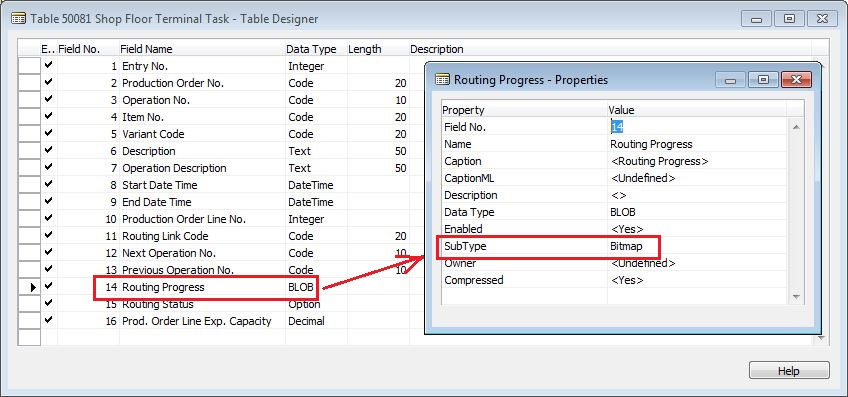
We start with creating a BLOB field in the table where we want to generate the progress bar. In this case it is in an custom table called Shop Floor Terminal Task, and the field for the progress bar I call Routing Progress. The SubType for the BLOB field is set to Bitmap.
ShopFloorTerminalTaskTable

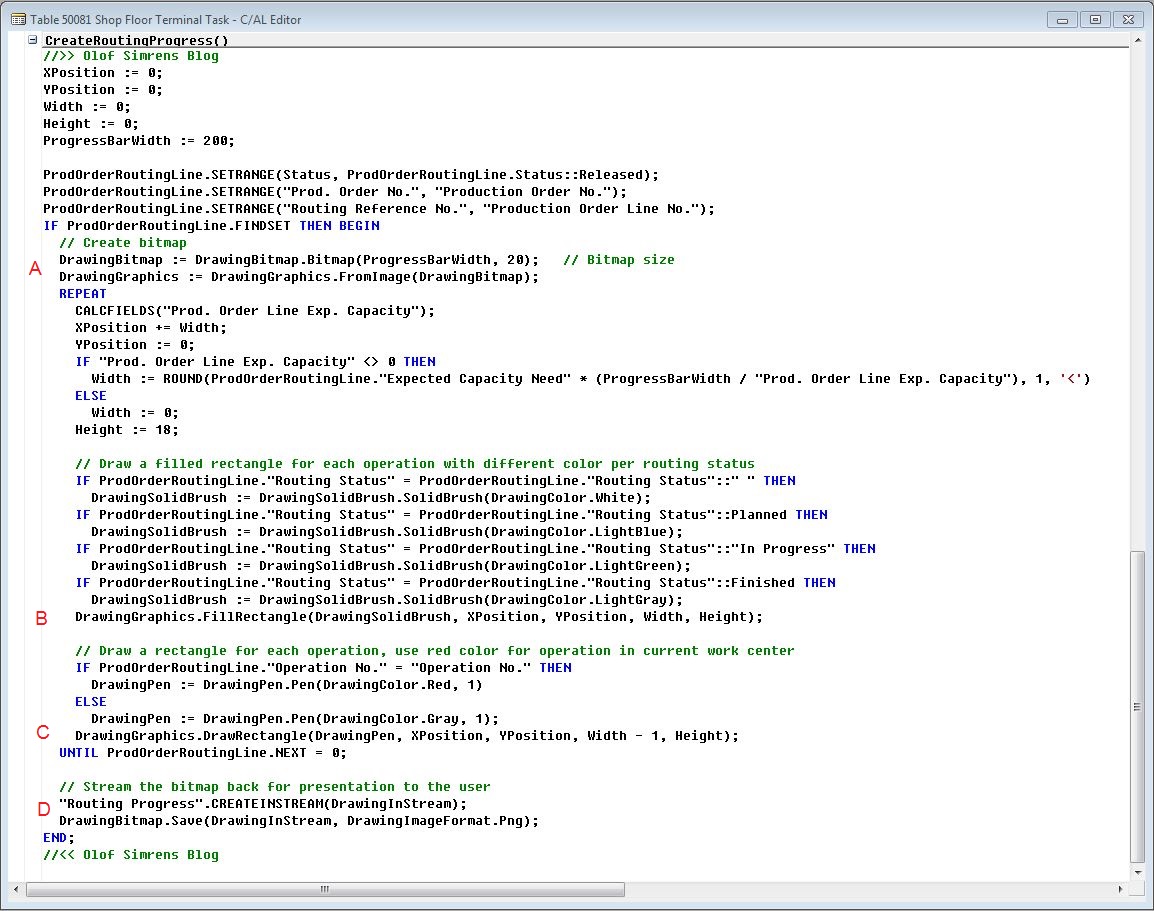
Next we create a function (in the same table) that will generate the progress bar and stream it into the BLOB field, in my case I call the function CreateRoutingProgress. In the function we add code to loop through the production order routing lines and build the progress bar with the following:

A. We first create a bitmap. The size of the bitmap can vary, but I think something like 200 wide and 20 high works good for a progress bar to be displayed in a list page.

B. Inside the loop we then draw a filled rectangle for each operation. We set the different colors according to the routing status. And the width of the rectangle varies based on the expected capacity need for the operation, this way long operations will get a wider rectangle.

C. In addition to the filled rectangle we also draw a regular rectangle. This will be drawn on top of the solid rectangle since it is place afterwards in the code. We make the rectangle for the operation that matches the operation in the task list red.

D. After we have looped through all the production order routing lines we stream the bitmap back into the BLOB field.
CodeToCreateRoutingProgress

The variables used are DotNet variables according to below (they are also in the sample download if you want to copy/paste them into your own application).

DotNetVariables

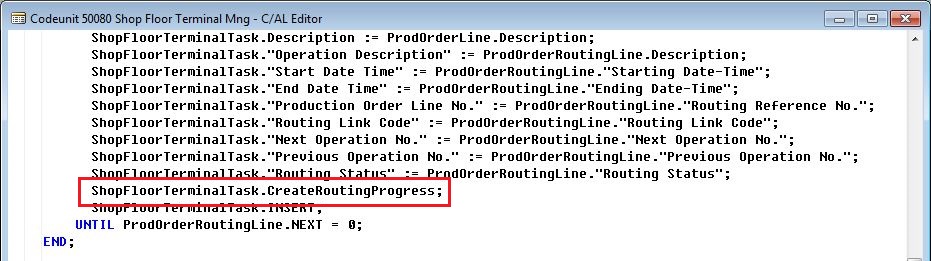
Now we have a BLOB field to store the progress bar and a function to generate it. We then call the CreateRoutingProgress function when the records are inserted (in this case I use a temporary table where records are inserted when the user runs the page).
CodeToCreateRoutingProgress

Time to test it! We run the page to see the result. The progress bars consists of parts that are different lengths based on the expected capacity need and each part has a color depending on the status of the operation. The part that has red edges represents the operation to be performed at the current work center. The operator can now easily see if the production order has been started and where in the process it is and can start preparing for upcoming jobs. Grey represent a finished operation, green represent an operation in progress, blue represent an operation that is planned, and white are operations where the routing status has not yet been changed. Nice! 🙂

CustomRoutingProgress

Conclusion

Creating simple graphical parts that represents different values or set of values to make things more visible in Dynamics NAV is very useful. Using DotNet variables like this to do it is actually quite easy once you got the first one to work.

The above is part of a Shop Floor Terminal role center that I am building for my own education. If it passes the ‘R&D stage’ then I will make it available in my downloads page. It will be world class or I will not publish it! 🙂

In the meantime I have added some sample objects (a table and a page) in the downloads page if you want to download and have a look at the code. The sample generates more basic progress bars that looks like below.

SampleProgressBars

Cool with colors! 🙂

Share this:

  • Share on Facebook (Opens in new window) Facebook
  • Share on X (Opens in new window) X

Related


Discover more from Olof Simren - Microsoft Dynamics 365 Business Central Blog

Subscribe to get the latest posts sent to your email.

Tags: .netDevelopmentProductionTask List
6 Comments
Share
5

About Olof Simren

I am a Microsoft Dynamics NAV and 365 Business Central Expert, I started implementing Microsoft Dynamics NAV in 2002, back then it was called Navision Attain. Throughout the years there has been many exciting implementations in different parts of the world, all of them with different challenges but with one common theme; manufacturing. As a consultant, I bring over 20 years of experience in implementing Microsoft Dynamics NAV and 365 Business Central within manufacturing and distribution companies. The services I offer includes project management, consultation, development and training. Feel free to contact me if you need help with anything related to Microsoft Dynamics NAV or 365 Business Central. I work through my company Naviona where I team up with other skilled Microsoft Dynamics NAV and 365 Business Central Experts.

You also might be interested in

Maintenance Production Orders

Mar 24, 2015

A way to handle maintenance on machines in Microsoft Dynamics[...]

View Change Log from Ribbon

Apr 25, 2014

The Change Log in Microsoft Dynamics NAV is used to[...]

Custom Business Chart Add-In Example for NAV 2013 R2

May 28, 2014

Here is an example of how to create a custom[...]

6 Comments

Leave your reply.
  • Ana
    · Reply

    June 3, 2015 at 11:49 PM

    Hello Olof,

    Great article! I have question. We have customer in MSDN 2015 and he would like to have Gantt diagram for Projects. Could you be so kind and advice me a how to solve it? Thank you very much for your time. Greetings from Slovakia.

    • Olof Simren
      · Reply

      Author
      June 4, 2015 at 8:55 AM

      Hello Ana,
      I am not familiar with a Gantt diagram for the Projects in NAV (I assume with ‘Projects’ you mean the ‘Jobs’ functionality).
      There are most likely add-ons that could do this, just that I don’t know them. Post a question om mibuso.com or something to see if someone else can guide you.

      /Olof

  • Miklos Hollender
    · Reply

    August 9, 2015 at 7:44 AM

    Thanks Olof, you have an uncanny way of posting exactly that what I need 🙂

    Thanks again,

    Bye

    Miklos Hollender
    navitips.blogspot.com

  • Javier
    · Reply

    May 10, 2016 at 10:24 AM

    Great post Olof.
    Simple, well explained and efficient
    Congratulations!

  • Younes
    · Reply

    September 26, 2017 at 11:48 AM

    where is the code unit shop floor terminal, I have not found in object code unit

    • Olof Simren
      · Reply

      Author
      October 2, 2017 at 8:13 AM

      Hi Younes,
      It is in the Shop Floor Terminal Role Center that you can download here;
      https://www.olofsimren.com/downloads/

      /Olof

Leave a Reply

Your email is safe with us.
Cancel Reply

Subscribe to My Blog via Email

Check Out Our Apps in AppSource

My Dynamics NAV Partner

Naviona, LLC

Categories

  • Assembly (3)
  • Development (35)
  • Finance (14)
  • General (28)
  • Inventory (24)
  • Manufacturing (36)
  • Miscellaneous (27)
  • Purchase (9)
  • Sales (11)
  • Warehouse (7)

Tags

.net Add-in AI AppSource Assembly Assembly BOM Business Central CAL Capacity Consumption Contact Copilot Costs Customer Development Dimensions Excel Finance Flushing General Ledger Inventory Item Item Tracking Low-Level Code MRP NAV 2015 NAV 2016 Output Planning Production Production BOM Production Orders Purchase Orders Receipts Reporting Reports Routing Sales Sales Order Stockkeeping Unit Subcontracting Task List Warehouse Warehouse Shipment Work Center

Recent Posts

  • Business Central Configuration Audit using Vibe Coding
  • Copilot in Planning Parameter Worksheet
  • Copilot in Planning Worksheet
  • Copilot Inventory Queries
  • Record Deletion Tool for Business Central in AppSource
  • Reopen Finished Production Orders
  • XML Buffer and CSV Buffer Tables
  • Functionality Improvements in NAV 2017
  • Reversing Production Output and Consumption
  • Return Merchandise Authorization (RMA)

Categories

  • Assembly
  • Development
  • Finance
  • General
  • Inventory
  • Manufacturing
  • Miscellaneous
  • Purchase
  • Sales
  • Warehouse

Contact Us

We're currently offline. Send us an email and we'll get back to you, asap.

Send Message

Categories

  • Assembly (3)
  • Development (35)
  • Finance (14)
  • General (28)
  • Inventory (24)
  • Manufacturing (36)
  • Miscellaneous (27)
  • Purchase (9)
  • Sales (11)
  • Warehouse (7)

Tags

.net Add-in AI AppSource Assembly Assembly BOM Business Central CAL Capacity Consumption Contact Copilot Costs Customer Development Dimensions Excel Finance Flushing General Ledger Inventory Item Item Tracking Low-Level Code MRP NAV 2015 NAV 2016 Output Planning Production Production BOM Production Orders Purchase Orders Receipts Reporting Reports Routing Sales Sales Order Stockkeeping Unit Subcontracting Task List Warehouse Warehouse Shipment Work Center

Recent Posts

  • Business Central Configuration Audit using Vibe Coding
  • Copilot in Planning Parameter Worksheet
  • Copilot in Planning Worksheet
  • Copilot Inventory Queries
  • Record Deletion Tool for Business Central in AppSource
  • Reopen Finished Production Orders
  • XML Buffer and CSV Buffer Tables
  • Functionality Improvements in NAV 2017
  • Reversing Production Output and Consumption
  • Return Merchandise Authorization (RMA)

Recent Comments

  • Olof on Business Central Configuration Audit using Vibe Coding
  • Andrew Trayfoot on Business Central Configuration Audit using Vibe Coding
  • Barrett Allen on Reopen Finished Production Orders
  • Kateryna on Business Central Configuration Audit using Vibe Coding
  • Takeshi Setoya on Reopen Finished Production Orders
  • Steve on Consignment Inventory
  • Olof Simren on Copilot in Planning Worksheet
  • Omaer Amjad on Copilot in Planning Worksheet

© 2026 · Olof Simren

  • Home
  • About Me
  • Contact Me
  • Downloads
  • White Papers
  • Web Sites
  • Post List
  • Articles
  • FAQ
Prev Next